React Native Architecture Explained: How Cross-Platform Mobile Apps Really Work in 2025
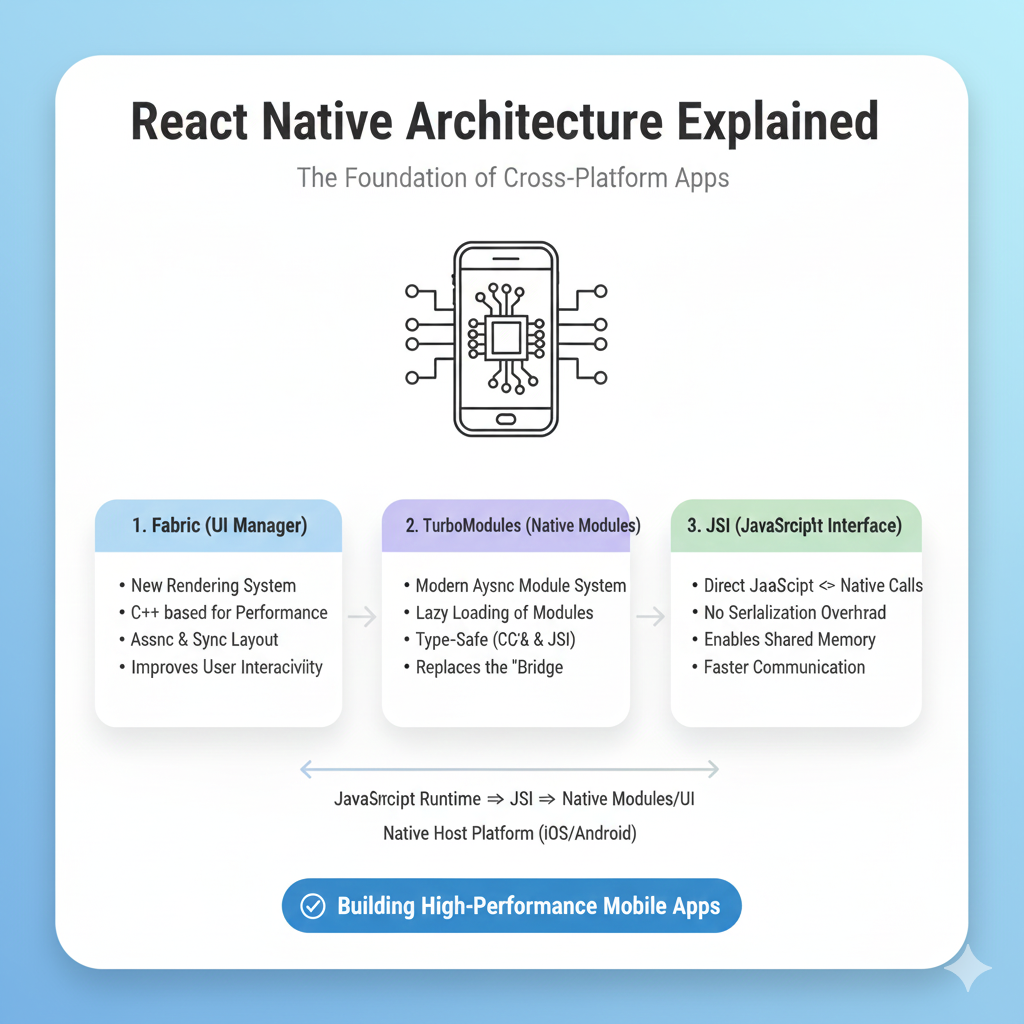
Dive deep into React Native's 3-layer architecture, understand how JavaScript creates native apps, see real-world examples, and learn best practices for building performant cross-platform mobile applications.
What If You Could Build for iPhone and Android with One Language?
Let's be real—building mobile apps can feel like a circus act. You're juggling Swift for iOS, Kotlin for Android, maintaining two separate codebases, debugging platform-specific issues, and somehow trying to keep features in sync. It's exhausting, expensive, and honestly, a bit ridiculous in 2025.
That's exactly why React Native became a game-changer. Imagine telling developers in 2015 they could build native-feeling apps for both platforms using JavaScript and React—they'd probably laugh. But that's what Facebook delivered, and today it powers everything from Instagram and Facebook to Airbnb (initially), Bloomberg, and Uber Eats.
So how does this magic actually work? How can JavaScript—traditionally a web language—somehow create real native iOS and Android apps? Let's peel back the layers of React Native's architecture and understand why it's not just a "web view in disguise" but a sophisticated bridge between JavaScript and native platforms.
React Native Architecture: The Three-Layer Model
At its core, React Native operates on a beautifully simple yet powerful three-layer architecture:
1. JavaScript Layer: Where You Write Code
This is where you, the developer, live. You write React components using JSX, JavaScript, and React's familiar component lifecycle. This layer contains your entire app's business logic, state management, and UI definitions.
What's cool is that this JavaScript runs in a separate JavaScript thread, not on the main UI thread. This means your JavaScript logic won't block the user interface—a critical design decision that keeps apps feeling responsive even during complex computations.
2. Native Layer: The Platform-Specific Power
Here's where the platform magic happens. This layer contains the actual native iOS (Objective-C/Swift) and Android (Java/Kotlin) code that renders UI components, accesses device APIs (camera, GPS, filesystem), and handles platform-specific interactions.
Think of this as the "ground team" that actually talks to the operating system. When you need to show a button, play a sound, or access the camera, this layer makes it happen using the platform's native capabilities.
3. The Bridge: The MVP of React Native
This is React Native's secret sauce—a communication layer that allows asynchronous, batched messages to flow between the JavaScript thread and the native modules. The bridge uses a serialized JSON format to pass messages back and forth, acting as a universal translator between two different worlds.
Here's the crucial part: Communication across the bridge is asynchronous. JavaScript sends a message saying "render a button here" and doesn't wait around for confirmation—it moves on to the next task. The native side processes these messages when it can. This asynchronous nature is why React Native feels responsive even when complex JavaScript logic is running.
Real Talk: How This Actually Plays Out in Production
Let's walk through what happens when you build a simple button component:
jsx
// JavaScript Layer (Your Code)
import { Pressable, Text } from 'react-native';

function MyButton({ onPress, title }) {
  return (
    <Pressable onPress={onPress}>
      <Text>{title}</Text>
    </Pressable>
  );
}
You write the React component in JavaScript
React Native serializes your component into a JSON message:
{ type: 'Pressable', props: { onPress: [function] }, children: [{ type: 'Text', props: { children: 'Click Me' } }] }The bridge passes this message to the native side
Native modules interpret this and create actual
UIButton(iOS) orButton(Android) instancesWhen tapped, the native button sends a message back through the bridge to trigger your JavaScript
onPressfunction
This process explains why React Native apps feel native—they're literally using native UI components, not web approximations.
The New Architecture: Turbocharging Performance
The original bridge architecture had limitations, especially with frequent communication between JavaScript and native code (think animations or scrolling). Facebook recognized this and has been rolling out the "New Architecture" with significant improvements:
JSI (JavaScript Interface): Replaces the old bridge with direct JavaScript-to-native communication through shared memory
Fabric: A new rendering system that makes UI operations synchronous and reduces overhead
TurboModules: Lazy-loaded native modules that improve startup time
The difference is like upgrading from mailing letters (old bridge) to instant messaging (JSI). Messages arrive immediately without serialization overhead.
Who's Actually Using This in Production?
React Native isn't just for side projects—it's enterprise-grade technology:
Facebook & Instagram: The OG users, constantly pushing React Native's capabilities
Shopify: Standardized their mobile development on React Native
Microsoft: Uses it for parts of Office and Xbox apps
Discord: Handles their mobile presence efficiently
Coinbase: Built their entire mobile app with React Native
These companies didn't choose React Native because it was "easy"—they chose it because when you need to maintain feature parity across iOS and Android with one team, it's the most pragmatic solution available.
When React Native Shines (And When It Doesn't)
Perfect Use Cases:
Startups needing to validate an idea on both platforms quickly
Cross-platform apps where 80-90% of code can be shared
Teams with web developers who can leverage existing React knowledge
Apps that don't require heavy graphics processing or complex native functionality
Consider Alternatives When:
You need maximum performance (games, complex animations)
Your app heavily uses platform-specific features not well-supported by React Native
You have the resources for two native teams and need pixel-perfect platform experiences
Building Your First React Native App: Developer Perspective
Starting with React Native today is surprisingly straightforward:
bash
npx react-native init MyAwesomeAppThe development experience feels familiar if you know React:
Hot reloading that actually works (most of the time)
Debugging in Chrome DevTools or Flipper
Native module installation with
npm installand occasionalpod install(iOS)
The ecosystem is mature, with solutions for:
Navigation (
React Navigation)State management (
Redux,Zustand,MobX)UI components (
NativeBase,React Native Elements)Database (
Realm,WatermelonDB)
Common Pitfalls (And How to Avoid Them)
Bridge bottlenecks: Minimize cross-bridge communication, especially in loops
Native module dependency: Some features still require writing native code
App size: JavaScript runtime adds overhead (though it's improved significantly)
Upgrade challenges: Major version upgrades can require manual intervention
Pro tip: Use the Hermes JavaScript engine (now default) for faster startup, smaller apps, and better memory usage.
FAQs: What Developers Actually Ask
Q: Is React Native being deprecated?
A: Absolutely not. Facebook continues to invest heavily, and the New Architecture rollout demonstrates long-term commitment.
Q: Can I use React Native for web too?
A: Yes! With React Native Web, you can share code between mobile and web platforms.
Q: How difficult is it to add custom native functionality?
A: Easier than you think—creating native modules is well-documented, and many community packages already exist for common needs.
Q: What about performance compared to native?
A: For most business apps, users can't tell the difference. For graphics-intensive apps, you might need to optimize or write custom native code.
Q: Should new developers learn React Native in 2025?
A: Yes! The job market for React Native developers is strong, especially for companies prioritizing cross-platform efficiency.
The Future Looks Cross-Platform
React Native's architecture represents a fundamental shift in how we think about mobile development. Instead of "write once, run anywhere" (which often meant lowest-common-denominator experiences), it's "learn once, write anywhere"—leveraging platform strengths while maximizing code reuse.
As the New Architecture stabilizes and adoption grows, React Native is positioned to become even more performant and capable. For businesses, this means faster development cycles and reduced costs. For developers, it means applying web development skills to the mobile world without sacrificing native quality.
The architecture we've explored today—from the JavaScript thread to the native modules to the bridging communication—shows that React Native isn't a "shortcut" or "hack" but a thoughtfully engineered solution to a real problem: how to build quality mobile experiences efficiently in a multi-platform world.
If you're excited about mastering technologies like React Native and want to build a career in modern software development, consider deepening your knowledge with structured learning. To learn professional software development courses such as Python Programming, Full Stack Development, and MERN Stack, visit and enroll today at codercrafter.in.









