Master real-time push & in-app notifications. Learn how they work, see best practices with real examples, and follow a step-by-step guide to build your own scalable system with Node.js & Firebase.
Ready to build an app that keeps users glued to their screens? You’re in the right place. Real-time notifications are the secret sauce behind every app you can’t put down. Think about the instant ping when your food delivery driver is around the corner or the live score update that pops up on your lock screen. These aren’t just features—they’re essential tools for driving engagement, boosting retention, and creating a seamless user experience.
In fact, research shows that push notifications can increase user engagement by up to 191% compared to sending no messages at all. But there’s a fine line between being helpful and becoming spam. This guide will walk you through everything, from the core concepts to building your own scalable system, so you can master that balance.
What Are Real-Time Notifications, Anyway?
Let’s break it down simply. Real-time notifications are instant alerts sent to a user’s device the moment something important happens. The keyword is instant. Unlike an email that sits in your inbox, these are designed for immediate attention.
They come in different flavors, and knowing which to use is key:
Push Notifications: These are the classic alerts that appear on your lock screen or as a banner, even when the app is closed. They’re perfect for time-sensitive info like a breaking news alert or a “Your ride is 2 minutes away” update.
In-App Notifications: These pop up while you’re actively using the app. Think of a banner at the top of your screen announcing a new feature, or a modal welcoming you back. They’re fantastic for guiding users, announcing updates, or requesting feedback without being as intrusive as a push.
Here’s a quick comparison to clear things up:
Feature | Push Notifications | In-App Notifications |
|---|---|---|
Primary Goal | Re-engage users and bring them back to the app. | Guide, inform, or assist users while they are in the app. |
When They Appear | On the device's lock screen or home screen, even if the app is closed. | Only within the app's interface while it is open. |
User Control | Users can disable them at the device OS level. | Controlled by the app creator/marketer. |
Best For | Cart abandonment alerts, breaking news, re-engagement offers. | User onboarding, feature tutorials, survey requests. |
How Do They Actually Work? The Tech Behind the Magic
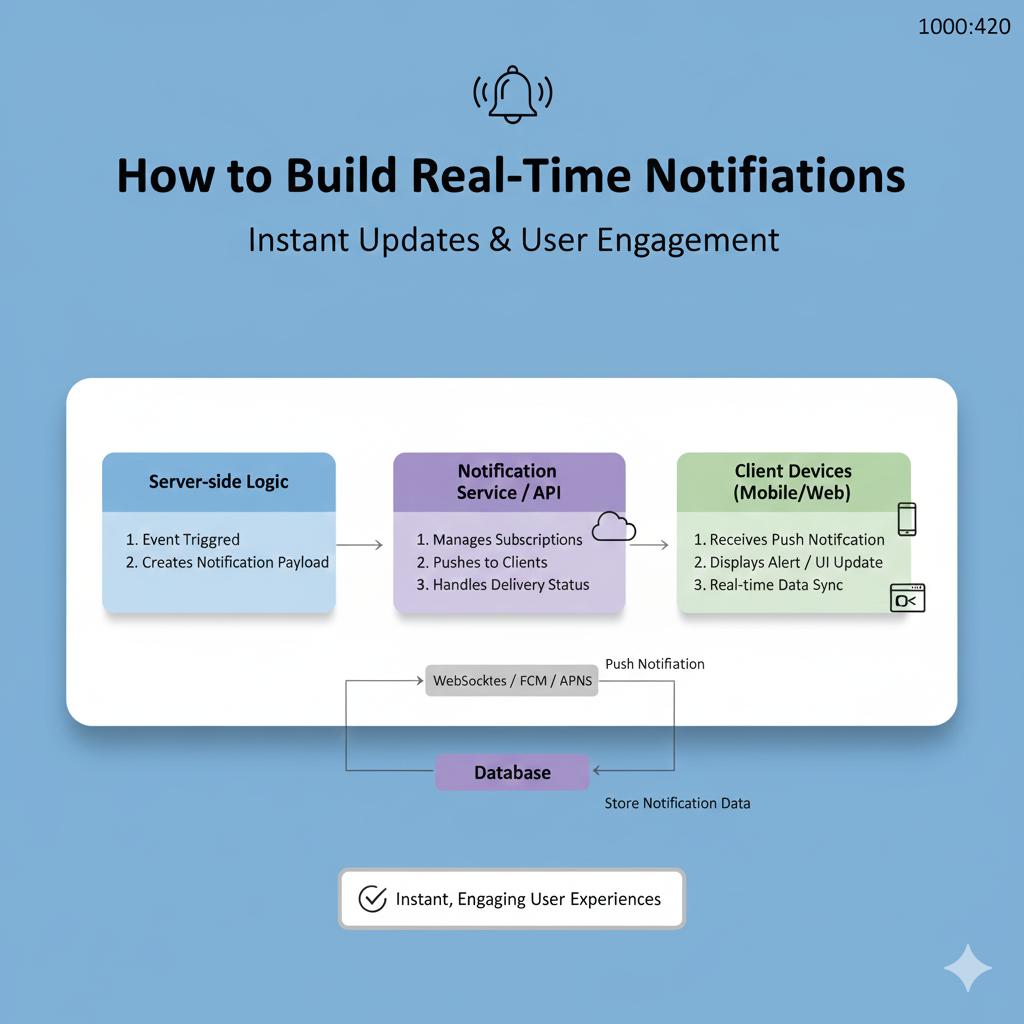
Sending a notification from your server to a user’s buzzing phone involves a clever dance of technology. At its heart, it’s an event-driven, push-based model. This means your server proactively sends a message instead of the user’s device constantly asking (“polling”) for updates, which saves battery and data.
The journey involves a few key players:
The Push Token: This is the unique address for a user’s device. When they opt into notifications, services like Apple’s APNs or Google’s Firebase Cloud Messaging (FCM) generate this token. No token, no notification.
The Communication Channel: For true real-time updates within an open app, developers use protocols like WebSockets (for two-way chat-like communication) or Server-Sent Events (SSE) (for one-way updates like a live news feed).
The Delivery System: For push notifications, your server sends the message to FCM or APNs, which then reliably deliver it to the target device. For in-app messages, the connection established via WebSockets or SSE carries the update directly.
Blueprint for Building: A Scalable Notification System
Ready to get your hands dirty? Let’s outline a robust, production-ready architecture. This isn’t just a toy example—it’s a system that can handle thousands of daily notifications.
Core Architecture: The Pub/Sub Model
The most scalable approach uses a Publish-Subscribe (Pub/Sub) pattern. Here’s how it flows:
Trigger: An event occurs in your app (e.g., an order status changes in your database).
Publish: A backend hook detects this change and publishes a “notification event” to a message broker like Redis.
Subscribe & Process: A dedicated notification service (e.g., an Express.js server) subscribes to this channel. It prepares the message, fetches the user’s device token, and decides on the delivery channel.
Deliver: It sends the formatted payload to FCM/APNs for push alerts or through a WebSocket connection for in-app alerts.
Key Implementation Snippets:
Database Collections: You’ll need tables for
device_tokens(to store user FCM tokens) andnotification_logs(for history and analytics).Secure API Endpoint: Your Express service needs a secure endpoint to send notifications. Critical elements include:
API Key Validation: Use timing-safe comparisons to prevent security attacks.
Rate Limiting: Prevent abuse by limiting requests, e.g., to 10 notification requests per minute per IP.
Batch Processing: Send to multiple users efficiently using methods like FCM’s
sendEachForMulticast, which supports up to 500 tokens per batch.
javascript
// Example of a secure, rate-limited notification endpoint in Express.js
app.post('/send-notification',
  validateApiKey, // Security check
  notificationLimiter, // Prevent spam
  async (req, res) => {
    // Process tokens in batches of 500
    const batchSize = 500;
    for (let i = 0; i < tokens.length; i += batchSize) {
      const batchTokens = tokens.slice(i, i + batchSize);
      const message = {
        tokens: batchTokens,
        notification: { title, body },
        data: { /* custom data */ }
      };
      // Send batch via Firebase Admin SDK
      const response = await messaging.sendEachForMulticast(message);
      // Log results for each token
    }
});
Best Practices: The Art of Not Being Annoying
Technology is only half the battle. The real skill is in the craft. Follow these rules to make sure your notifications are welcomed, not blocked.
Be Relevant & Personal: This is non-negotiable. Use data to personalize. “Your order #1234 is out for delivery” is infinitely better than “There’s an update on your order.” Base messages on user behavior—like alerting them that a viewed item is now on sale.
Time It Right: Send messages when users are most likely to engage. Use local time zones and avoid late-night pings. A fitness app might delay a workout reminder if it detects the user is driving.
Crystal Clear Copy: You have seconds of attention. Be concise, actionable, and lead with value.
Headline: Get to the point fast (under 50 characters).
Body: Expand with clear value (“Get 25% off all athletic wear—now through Friday!”).
Call-to-Action (CTA): Use strong verbs. “Track order,” “Finish checkout,” “Claim offer”.
Give Control & Avoid Fatigue: Bombarding users is the fastest path to app uninstalls. Don’t overdo it. Let users choose what they want to be notified about. Space out your messages and make each one count.
Real-World Use Cases That Convert
Theory is great, but what does success look like? Here are proven examples:
E-commerce – Abandoned Cart Recovery: “Still thinking it over, [Name]? Your saved items are almost gone. Complete your order!” This uses personalization, urgency, and targets a warm, high-intent audience.
SaaS – Feature Adoption & Onboarding: “Welcome! Finish setting up your dashboard to unlock personalized insights.” This guides new users to a key “Aha!” moment, reducing early churn.
Delivery Apps – Real-Time Tracking: “Your order is on its way! Ray is arriving in 8 minutes.” This provides immense utility, reduces anxiety, and builds trust.
Content & Social – Re-engagement: “It’s been a while! [Friend’s Name] just posted a new photo.” This leverages social context to pull users back in.
Your Notification Toolkit: FAQs
What’s the simplest way to add notifications to my web app?
For web push notifications, you can use browser APIs (Service Workers, Push API) or a third-party service like MagicBell or Elfsight to handle the complexity. For in-app live updates, start with Socket.IO for WebSockets.Can I send notifications when the app is closed?
Yes, but only as push notifications delivered via FCM/APNs. In-app notifications require an active app connection.How do I prevent my server from crashing during a big notification blast?
Implement rate limiting on your sending service. Instead of blasting 5 million messages at once, spread them out over several minutes. Also, use batch sending APIs provided by FCM.My users are disabling notifications. What am I doing wrong?
You’re likely sending too many low-value messages. Audit your notifications. Are they relevant, personalized, and timely? Reduce frequency and increase quality. Let users customize their preferences.
Conclusion: Notifications as a Conversation
Building a world-class real-time notification system is a blend of solid engineering and deep user empathy. It’s about choosing the right stack—whether it’s Node.js with Socket.IO, Firebase Cloud Messaging, or a managed service—and then using it to start a respectful, valuable conversation with your users.
Start with a simple architecture, implement security and rate-limiting from day one, and always, always write copy that serves the user first. When value, timing, and relevance align, a notification feels less like marketing and more like a helpful nudge from a friend.
To learn professional software development courses such as Python Programming, Full-Sta-ck Development, and MERN Stack, visit and enroll today at codercrafter.in. Master the skills needed to build dynamic, real-time features that define modern web and mobile applications.