Updated for 2026: compare TouchableOpacity and Pressable in React Native with code examples, performance notes, and a clear recommendation for new projects.
So you're building a React Native app, and you need something users can actually tap on. You've probably heard about both TouchableOpacity and Pressable, but what's the real difference? Which one should you actually use in 2025?
Let's break this down without the technical jargon and figure out which component deserves a spot in your next project.
What's TouchableOpacity? The Old Reliable
Think of TouchableOpacity as that reliable car you learned to drive with - it gets the job done, everyone knows how it works, and it has that familiar feel.
TouchableOpacity is essentially a wrapper that makes any view respond to touches by changing its opacity when pressed. When you tap it, the element "dimms" to give you that satisfying visual feedback that says "Hey, I felt that!"
Here's the basic setup:
javascript
import { TouchableOpacity, Text } from 'react-native';

<TouchableOpacity onPress={() => console.log('Button pressed')}>
  <Text>Press Button</Text>
</TouchableOpacity>
What's cool is that you can customize how much it dims with the activeOpacity prop (default is 0.2, making it 20% transparent when pressed). Want it to dim less? Set activeOpacity={0.7} and you're golden.
The best part? You can style it just like a regular View component, which means your buttons can look exactly how you want without being limited by platform-specific button styles.
Meet Pressable: The New Kid on the Block
Introduced in React Native 0.63, Pressable is like the Swiss Army knife of touch handlers. It's versatile, powerful, and honestly, a bit more sophisticated than our old friend TouchableOpacity.
Pressable can detect various stages of press interactions and gives you way more control over what happens when users interact with your elements. Check out this example:
javascript
import { Pressable, Text } from 'react-native';

<Pressable onPress={() => console.log('Pressed')}>
  {({ pressed }) => (
    <Text style={{ opacity: pressed ? 0.5 : 1 }}>
      {pressed ? 'Pressed!' : 'Press Me'}
    </Text>
  )}
</Pressable>
See what's happening there? You get access to the pressed state, which means you can customize the feedback based on whether the component is currently being pressed. That's way more flexible than TouchableOpacity's simple opacity change.
The Showdown: Key Differences You Need to Know
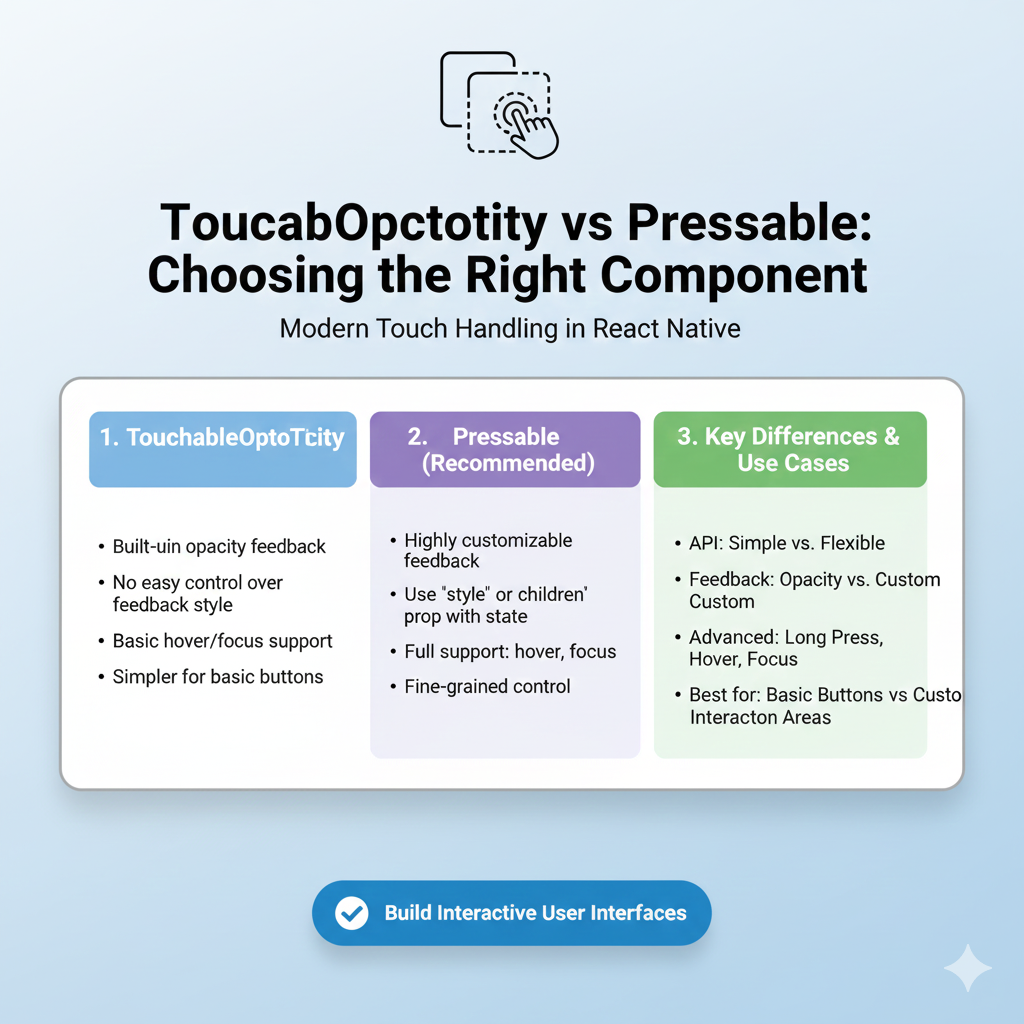
1. Feedback Control
TouchableOpacity: Automatically changes opacity. That's it. Simple but limited.
Pressable: You control everything. Change opacity, scale, colors, borders - whatever you want based on the pressed state.
2. Event Granularity
TouchableOpacity: Basically gives you
onPressand that's your main event.Pressable: Offers
onPressIn,onPressOut,onLongPress,onHoverIn(for web), and more. You can detect when a press starts, ends, or turns into a long press.
3. Hit Detection
Both support hitSlop to expand the tappable area, but Pressable adds pressRetentionOffset which controls how far your finger can move while maintaining the press. This is super useful for those "sliding off the button but still wanting it to trigger" scenarios.
4. Platform-Specific Goodies
Pressable has android_ripple for that native Android ripple effect and handles TV focus navigation out of the box. TouchableOpacity? Not so much.
When Should You Use Which?
Go with TouchableOpacity when:
You need a simple button with opacity feedback
You're working on a quick prototype
You or your team are more familiar with it (no shame in that!)
You don't need advanced press states or platform-specific effects
Switch to Pressable when:
You need custom feedback beyond just opacity changes
You want to handle different press stages (press in, press out, long press)
You're building for multiple platforms (including web with hover states)
You want to future-proof your code (the React Native team recommends it)
You need Android ripple effects or advanced accessibility features
Real-World Examples That Actually Make Sense
Example 1: The Social Media "Like" Button
javascript
// With Pressable - more interactive feedback
<Pressable
  onPress={handleLike}
  style={({ pressed }) => ({
    transform: [{ scale: pressed ? 0.95 : 1 }],
    opacity: pressed ? 0.8 : 1
  })}>
  {({ pressed }) => (
    <HeartIcon filled={isLiked} color={pressed ? '#ff4444' : '#666'} />
  )}
</Pressable>
Example 2: E-commerce "Add to Cart"
javascript
// With TouchableOpacity - simple and effective
<TouchableOpacity
  onPress={addToCart}
  activeOpacity={0.7}
  style={styles.addToCartButton}>
  <Text style={styles.buttonText}>Add to Cart</Text>
</TouchableOpacity>
Common Pitfalls and How to Avoid Them
Over-engineering with Pressable: Don't use Pressable if you just need simple opacity feedback. That's like using a chainsaw to cut butter.
Accessibility neglect: Both components support accessibility props, but Pressable gives you more control. Always add
accessibilityLabelandaccessibilityRole.Hit area too small: Remember to use
hitSlopfor small touch targets. Your users' fingers will thank you.Ignoring disabled states: Both support
disabledprop, but with Pressable, you can customize how disabled elements look using the pressed state function.
The Migration Path
Already have a ton of TouchableOpacity components? Here's how to migrate without losing your mind:
Start new components with Pressable - Future you will be grateful.
Convert TouchableOpacity to Pressable when you need more features - No need to fix what isn't broken.
Create a wrapper component if you need consistency across your codebase.
javascript
// CustomButton.js - A Pressable-based button that mimics TouchableOpacity
const CustomButton = ({ onPress, children, activeOpacity = 0.2, ...props }) => (
  <Pressable
    onPress={onPress}
    style={({ pressed }) => ({
      opacity: pressed ? activeOpacity : 1
    })}
    {...props}>
    {children}
  </Pressable>
);
What the Experts Are Saying
The React Native documentation itself suggests that if you're "looking for a more extensive and future-proof way to handle touch-based input, check out the Pressable API". That's a pretty clear signal about where things are headed.
Most developers in the community are gradually shifting to Pressable for new projects, especially since it offers better performance through the Pressability API and more consistent behavior across platforms.
The Verdict
So, which one wins? Honestly, it depends on your needs.
TouchableOpacity is like your favorite old hoodie - comfortable, reliable, and perfect for simple tasks. It's not going anywhere soon, and for good reason.
Pressable is like that versatile jacket with all the pockets - it can handle more situations, adapts better to different environments, and honestly, it's what the cool kids are wearing these days.
For most new projects in 2025, I'd recommend starting with Pressable. The learning curve is minimal, and the flexibility pays off as your app grows. But if you're maintaining an older codebase or building something super simple, TouchableOpacity is still a perfectly valid choice.
Remember, the best choice is the one that makes your app more usable and your development process smoother. Sometimes that's the shiny new tool, and sometimes it's the reliable old one.
Ready to master React Native and build amazing mobile apps? To learn professional software development courses such as Python Programming, Full Stack Development, and MERN Stack, visit and enroll today at codercrafter.in. Our expert-led courses will take you from beginner to job-ready developer with hands-on projects and real-world examples.