Taming Large State: A Developer's Guide to Efficient State Management
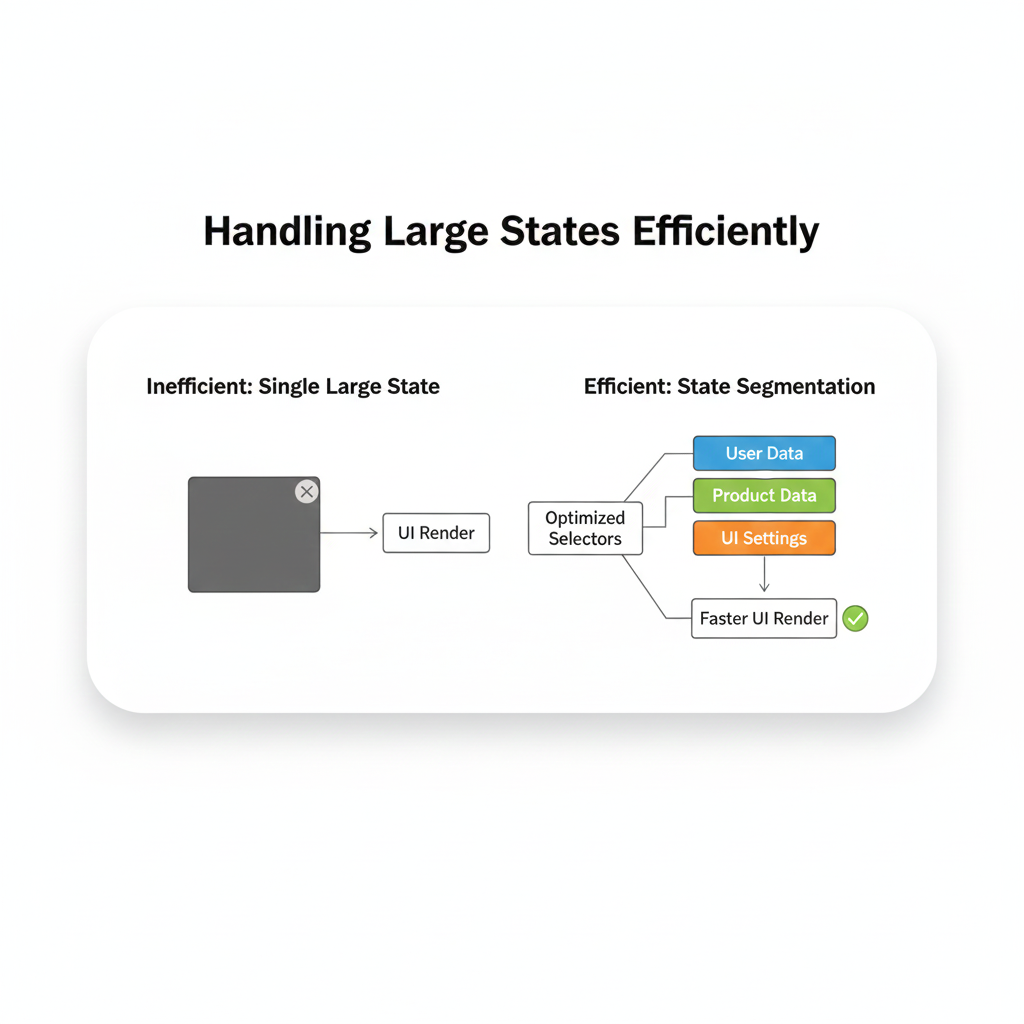
Is your app's state slowing you down? Learn expert strategies & tools (Zustand, Redux, Context) to manage large state efficiently. Build faster, smoother React apps. Master these skills at CoderCrafter.
Taming the Beast: Your Ultimate Guide to Handling Large States Without Losing Your Mind
Alright, let's talk about something every developer hits eventually: the wall. You're cruising along, your app is sleek, your features are popping, and then… state starts to bloat. That once-manageable useState hook is now a 500-line monstrosity. Your components are re-rendering if a butterfly flaps its wings three continents away. Performance is chugging, bugs are multiplying, and that feeling of control? Gone.
Welcome to the world of Large State Management. It's not about avoiding state—that's impossible. It's about handling it so efficiently that your app feels buttery smooth, your code stays readable, and you keep your sanity. If you're building anything more complex than a to-do list (and let's be real, even those get feature-creep), this is for you.
What Exactly is "Large State"?
Think of your app's state as its memory. It's everything it needs to remember: the user's login info, the items in their cart, the theme they picked, whether that modal is open, you name it.
A "large" state isn't just about the size of the object (though a deeply nested, 10MB state tree qualifies). It's about complexity and scope. It's when:
State is shared across many, many components (prop drilling hell, anyone?).
Updates are frequent and intertwined (change one thing, five other things need to react).
The logic to update the state becomes a tangled web of
setStatecalls.You start seeing unnecessary re-renders that make your app feel sluggish.
In today's world of rich, single-page applications (think Figma, Notion, or complex dashboards), managing this efficiently isn't a luxury—it's a survival skill.
Why Should You Even Care? The Real-World Impact
Let's make it tangible. You've built a slick e-commerce frontend.
Bad State Management: Every keystroke in the search bar freezes the UI for a second. Adding an item to the cart makes the whole product list flicker. If you open your browser's React DevTools, you'll see a fireworks display of component re-renders on every action. Users bounce. Fast.
Good State Management: Search is instant. The cart updates with a satisfying, isolated animation. The product grid sits untouched and serene. The app feels responsive and professional.
The difference? How you structured and updated your state.
Leveling Up: From useState to State Management Zen
So, how do we move from chaos to control? Let's walk through the evolution.
Level 1: The Basics (useState, useReducer)
For component-specific state, useState is your best friend. When a single state gets update logic that's a bit complex (think: a multi-step form), useReducer is a fantastic upgrade. It's like having a dedicated manager for that state's update rules.
Level 2: The Prop Drilling Dilemma & Context
What if a state (like user auth or theme) is needed by a component waaaaay down the tree? Passing it through every component (prop drilling) is messy and causes re-renders for everyone in the chain.
Enter Context API. It's like a PA system. You broadcast the state (theme: 'dark') from a top-level provider, and any component deep down can listen in with useContext. It's built into React and perfect for low-frequency updates (like theme or user info).
But here's the catch: Context isn't a full-state management solution. If the value in your Context changes, every component subscribed to that Context re-renders, even if they only need a tiny, unchanged piece of the data. For large, frequently changing state, this can be a performance killer.
Level 3: The Heavy Hitters (State Management Libraries)
This is where dedicated libraries shine. They give you a centralized store and precise update mechanisms.
Zustand: The cool, minimalist kid on the block. It's incredibly simple, uses hooks, has almost no boilerplate, and is shockingly powerful. You create a store, define your state and actions, and use it anywhere. It's my personal go-to for most projects now.
Redux Toolkit (RTK): The mature, robust enterprise solution. The old Redux had a reputation for boilerplate, but RTK fixes that. It provides a predictable structure, amazing devtools, and is fantastic for very large, complex apps where multiple teams need to work on the same state logic.
Recoil/Jotai: These take an atomic approach. Instead of one giant store, you manage tiny, independent pieces of state (atoms). Components subscribe only to the atoms they need, making re-renders super granular and efficient. Very elegant for certain problems.
Real-World Use Case: The Dashboard From Hell
Imagine a live analytics dashboard with:
Real-time data streams
User-configurable widgets
Multiple chart types
A global time-range filter
Theme settings
Using just useState and Context would be a recipe for a laggy, buggy mess. Here’s how a modern approach (using Zustand as an example) would look:
javascript
// store/dashboardStore.js
import { create } from 'zustand';

const useDashboardStore = create((set) => ({
  // State
  timeRange: 'last24h',
  widgets: [],
  liveData: {},
  theme: 'light',

  // Actions (methods to update state)
  setTimeRange: (range) => set({ timeRange: range }),
  addWidget: (widget) => set((state) => ({
    widgets: [...state.widgets, widget]
  })),
  updateLiveData: (newData) => set((state) => ({
    liveData: { ...state.liveData, ...newData }
  })),
  toggleTheme: () => set((state) => ({
    theme: state.theme === 'light' ? 'dark' : 'light'
  })),
}));

// components/TimePicker.js
function TimePicker() {
  // This component ONLY re-renders when timeRange changes
  const { timeRange, setTimeRange } = useDashboardStore((state) => ({
    timeRange: state.timeRange,
    setTimeRange: state.setTimeRange,
  }));
  return <select value={timeRange} onChange={e => setTimeRange(e.target.value)}>...</select>;
}

// components/DataChart.js
function DataChart({ widgetId }) {
  // This component ONLY re-renders when its specific piece of liveData changes
  const data = useDashboardStore((state) => state.liveData[widgetId]);
  return <Chart data={data} />;
}
See the magic? Clean separation, no prop drilling, and most importantly, granular updates. Each component only cares about its slice of the state pie.
Best Practices to Live By
Don't Over-Engineer: Start with
useStateanduseReducer. Lift state up only when you need to. Add Zustand/Redux when you feel the pain of prop drilling or complex updates.Normalize Your State: Don't nest data too deeply. Keep it flat, like a database. Instead of
{ posts: [{ comments: [...] }] }, try{ posts: {}, comments: {}, postCommentMap: {} }. This makes updates much simpler.Derive What You Can: Don't store state you can calculate. Store a
selectedCategoryand a list ofallProducts, then derivefilteredProductswith auseMemo. This is a single source of truth.Use Selectors Wisely: In Zustand/Redux, always use selective subscriptions. Don't grab the whole store if you only need one value.
Batch Updates: If you're changing multiple related state values at once (after an API call), do it in one action. This prevents multiple, wasteful re-renders.
Persist Strategically: Use libraries like
zustand/middlewareorredux-persistto save state tolocalStoragefor things like user preferences or cart items, so they survive a page refresh.
FAQs (The Stuff You Actually Google)
Q: Should I use Context or Redux/Zustand?
A: Use Context for truly global, static or low-frequency values (theme, auth user). Use a state library for global, dynamic, and frequently updating data (shopping cart, form state, live notifications).
Q: Isn't Redux dead?
A: Not even close. Redux Toolkit (RTK) modernized it completely. It's incredibly powerful for large-scale apps. Zustand is often simpler for mid-sized projects.
Q: Does this only apply to React?
A: The core concepts are universal. Vue has Pinia/Vuex, Svelte has stores, and Solid.js has built-in fine-grained reactivity patterns. The principles of centralized stores, predictable updates, and derived state are key everywhere.
Q: How do I debug large state?
A: DevTools are non-negotiable. Redux DevTools are legendary. Zustand has a simple middleware to plug into them. They let you time-travel through state changes, see diffs, and trace where an update came from. Lifesaver.
Wrapping It Up
Handling large state efficiently is the hallmark of a senior developer. It's what separates a prototype that falls apart from a production app that scales. It's not about memorizing a library's API, but about understanding the principles: isolation, predictability, and granularity.
Start simple, recognize the signs of state spaghetti (excessive props, confusing updates, performance lag), and then confidently reach for the right tool. Your future self—and your users—will thank you.
Mastering state management is a core pillar of modern web development. It's the kind of deep, practical skill that turns you from a coder into a software crafter.
Ready to build scalable, performant applications the right way? To learn professional software development courses such as Python Programming, Full Stack Development, and the MERN Stack, where you'll tackle real-world projects with complex state, visit and enroll today at codercrafter.in. Build the foundation, then master the craft.









