Stuck on async logic in Redux? This in-depth, beginner-friendly guide explains Redux Middleware, Thunk, real-world use cases, and best practices. Level up your state management skills today.
Let’s be real for a second. If you’ve worked with Redux, you know the drill: actions fire, reducers do their pure, predictable thing, and state updates. It’s clean, it’s beautiful… and then you need to, you know, do something. Like fetch data from an API. Or log every action for debugging. Or handle errors gracefully without your app exploding into a million pieces.
Suddenly, that pristine flow feels… limiting. You find yourself asking, “Where do I put this logic?” If you’ve ever crammed a fetch call inside an action creator and felt a tiny pang of guilt, you’re not alone. This is exactly where Redux Middleware swoops in to save your sanity.
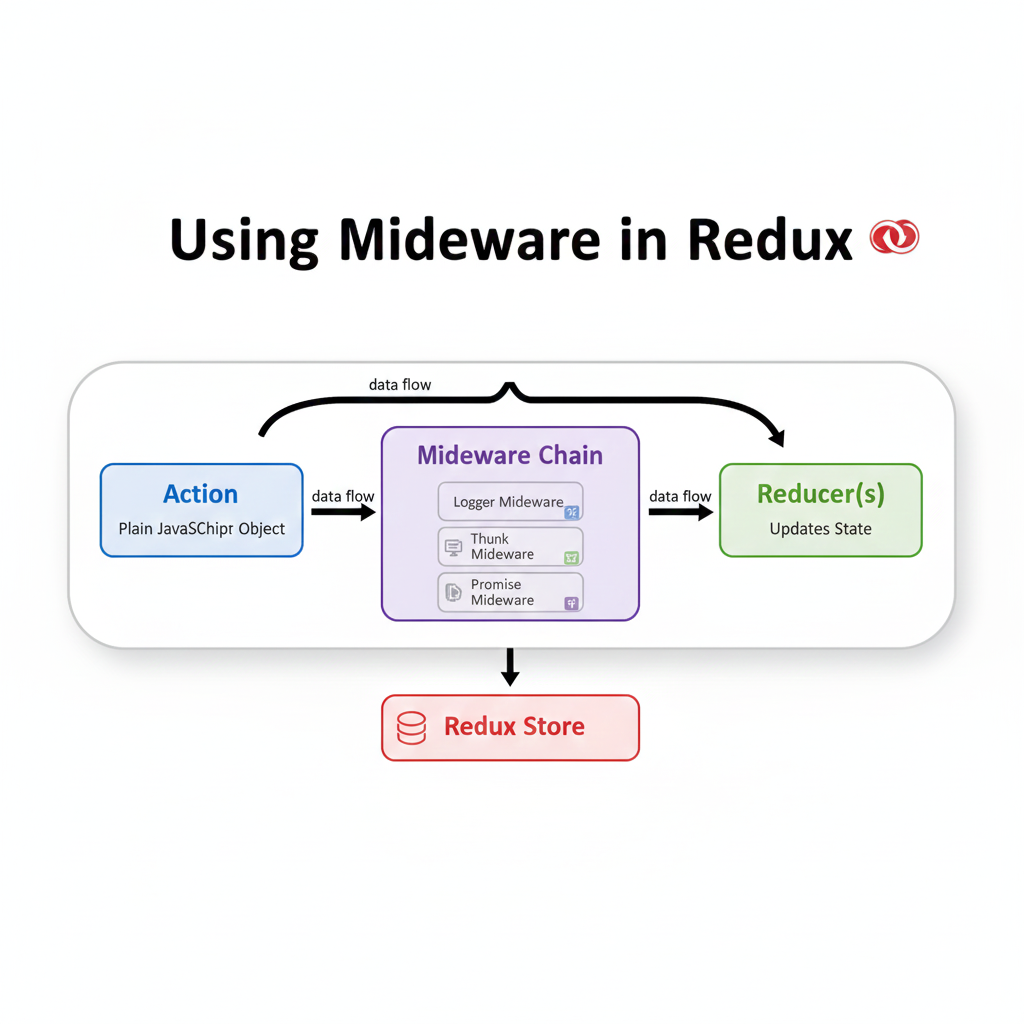
Think of middleware as the ultimate bouncer for your Redux club. Every single action that tries to get to your reducers has to pass through this checkpoint first. And at this checkpoint, you can inspect the action, delay it, transform it, log it, or even dispatch completely new actions. It’s the single most powerful tool for managing side effects and cross-cutting concerns in your Redux application.
What the Heck is Middleware, Actually?
In plain English, middleware is a piece of code that sits between the moment you dispatch an action and the moment that action reaches the reducer. It’s a chain of functions that get a chance to do something with every action that flows through your app.
The official docs can get a bit jargon-y, so here’s my attempt: Middleware is like a series of processing stations on an assembly line. The action is the product moving down the line. At one station (a middleware), you might stamp it with a timestamp (logging). At the next, you might attach some extra data. At another, you might decide to send it off to a different factory (an API call) before letting it continue.
The key superpower? Middleware can “swallow” an action, transform it, or let it pass through unchanged. It has access to the dispatch and getState functions, meaning it can read the current state and dispatch new actions based on what’s happening.
The Basic Anatomy: A Peek Under the Hood
A middleware function follows a specific, curried structure that looks weird at first but becomes second nature. It’s a function that returns a function that returns a function (yes, a triple-layer function burrito).
javascript
const myMiddleware = (store) => (next) => (action) => {
  // 1. `store`: Contains `dispatch` and `getState`
  // 2. `next`: A function to pass the action to the NEXT middleware (or the reducer)
  // 3. `action`: The current action object

  // Do your stuff here BEFORE the action hits the reducer
  console.log('Dispatching action:', action);

  // Pass the action to the next middleware in the chain
  const result = next(action);

  // Do your stuff here AFTER the action has gone through the reducers
  console.log('New state:', store.getState());

  return result;
};
The magic is in that next(action) call. That’s what keeps the chain moving. If you forget to call it, the action dies right there, and your reducers will never see it.
Real-World Use Cases: Where Middleware Shines
You don’t add middleware just for fun. You add it to solve specific, often messy, problems. Here are the big three you’ll encounter daily.
1. API Calls & Async Logic (The Big One)
This is the MVP. Vanilla Redux actions are synchronous. The world is not. Enter Redux Thunk. It’s a middleware that allows your action creators to return a function instead of a plain action object. This function receives dispatch and getState as arguments.
javascript
// Without Thunk: Broken dreams
const fetchUser = (userId) => {
  // Can't do this! Action creators must return plain objects.
  const data = await api.fetchUser(userId);
  return { type: 'USER_LOADED', payload: data };
};

// With Thunk: Glorious async freedom
const fetchUser = (userId) => {
  return async (dispatch, getState) => {
    dispatch({ type: 'USER_LOADING' }); // Dispatch a loading state
    try {
      const data = await api.fetchUser(userId);
      dispatch({ type: 'USER_LOADED', payload: data }); // Success!
    } catch (error) {
      dispatch({ type: 'USER_ERROR', payload: error }); // Handle error
    }
  };
};

// Dispatch it like normal
dispatch(fetchUser(123));
Thunk makes handling loading states, errors, and conditional API logic straightforward and centralized.
2. Logging & Debugging
Want to see every action and state change in your console? Redux Logger is the go-to middleware. It prints the previous state, the action, and the next state in a clean, collapsible format. It’s invaluable for debugging. You can also build custom loggers to send analytics events to your servers on specific actions.
3. Error Tracking & Reporting
Imagine automatically catching every error from your API calls and sending it to a service like Sentry or LogRocket. A custom error-handling middleware can do that elegantly.
javascript
const errorReporter = (store) => (next) => (action) => {
  try {
    return next(action);
  } catch (err) {
    console.error('Caught an exception!', err);
    // Send error report to your service
    errorService.send(err);
    // You can even re-throw or dispatch a generic error action
    throw err;
  }
};
Setting Up Middleware: The Modern Way
Gone are the days of applyMiddleware being a puzzle. With Redux Toolkit (RTK)—which you should be using—it’s a breeze.
javascript
// store.js
import { configureStore } from '@reduxjs/toolkit';
import { thunk } from 'redux-thunk'; // Note: Thunk is NOT included by default in RTK 2.0+
import logger from 'redux-logger';
import rootReducer from './reducers';

const store = configureStore({
  reducer: rootReducer,
  middleware: (getDefaultMiddleware) =>
    getDefaultMiddleware().concat(thunk, logger),
  // getDefaultMiddleware already includes essential middleware like redux-thunk in some setups
});

export default store;
Best Practices & Gotchas
Order Matters: Middleware runs in the order it’s applied. If you put logger before thunk, you might not see the final form of async actions. A typical order is: error reporting -> thunk/saga -> logger (at the end to see the final outcome).
Don’t Mutate Anything: Just like reducers, middleware should be pure. Don’t mutate the
actionobject. Clone it if you need to modify it.Know When NOT to Use Middleware: Is your side effect tightly coupled to a single component? Maybe a
useEffecthook is simpler. Middleware is best for effects that impact multiple parts of your app or are central to your business logic.Consider Redux-Saga for Complex Flows: If you’re dealing with complex async workflows with cancellations, debouncing, or intricate sequencing (think: “login, then fetch user, then fetch messages”), Redux-Saga (another middleware) using ES6 generators might be a more manageable solution than thunks. It’s a steeper learning curve but incredibly powerful.
FAQ: Your Burning Questions, Answered
Q: Can I use multiple middlewares?
A: Absolutely! That’s the whole point. Chain them together. Each will process the action in sequence.
Q: Thunk vs. Saga vs. RTK Query? Which one?
A: Great question.
Thunk: Simple, straightforward. Perfect for most apps. Start here.
Saga: Powerful for very complex, long-running async processes that feel like “background threads.”
RTK Query (Part of Redux Toolkit): This is a game-changer. If your app is mostly about fetching and caching data from APIs, consider using RTK Query instead of writing thunks or sagas manually. It handles loading states, errors, caching, and refetching automatically.
Q: Does middleware slow down my app?
A: Negligibly. The overhead of a few function calls is tiny compared to the network requests and rendering your app does. The benefits for debugging and structure far outweigh the cost.
Q: Can I write my own?
A: 100%. Even if you just do it as an exercise, writing a simple logging middleware is the best way to understand the flow.
Conclusion: Embrace the Power
Middleware transforms Redux from a simple state container into a robust, predictable state manager. It’s the bridge between the perfect, synchronous world of your reducers and the messy, asynchronous reality of building real applications.
Start with Redux Thunk for async. Add Redux Logger for debugging. As you grow, explore writing a small custom middleware for a specific need—you’ll gain a deep appreciation for the elegance of the pattern.
Mastering these concepts is what separates someone who uses Redux from someone who truly architects with it. It’s the key to building scalable, maintainable, and rock-solid applications.
Ready to move beyond the basics and architect robust, production-ready applications? To learn professional software development courses such as Python Programming, Full Stack Development, and the MERN Stack (which dives deep into state management with Redux), visit and enroll today at codercrafter.in. We’ll guide you from core concepts to advanced patterns, giving you the skills to build the apps of tomorrow.