React Native History & Guide 2025: From Facebook's Mistake to Mobile Dominance | CoderCrafter
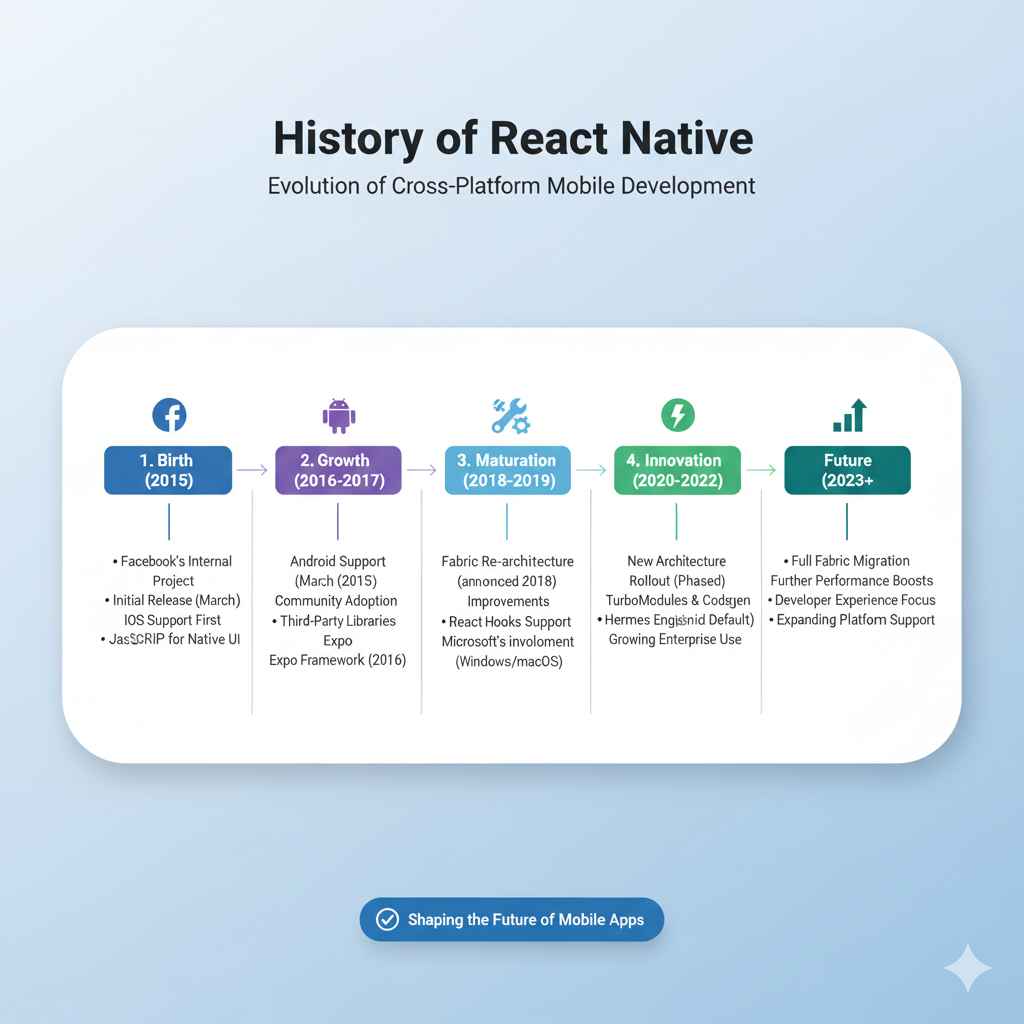
Discover the complete history of React Native from its 2013 Facebook hackathon origins to 2025's Fabric architecture. Learn how it works, who uses it, best practices, and why it dominates cross-platform development.
So, you want to build a mobile app? Let me guess—you're probably debating whether to go native (separate iOS and Android teams, double the cost, double the time) or cross-platform (write once, run anywhere, but will it feel right?). If this sounds familiar, then you're about to learn why React Native has completely transformed this conversation for developers and businesses worldwide.
This isn't just another tech framework story. This is about how a failed bet on HTML5 led to one of the most significant shifts in mobile development history. Grab your coffee, and let's dive into how React Native went from a Facebook hackathon project to powering apps used by billions.
The Genesis Story: Facebook's "Biggest Mistake"
Let's rewind to 2012. Mark Zuckerberg made a startling public admission: "The biggest mistake we made as a company was betting too much on HTML5 as opposed to native". Ouch. Facebook had tried to use web technologies (HTML5) for their mobile apps, and the result was—frankly—terrible. Slow performance, clunky interfaces, and an overall disappointing user experience.
This failure created an urgent need within Facebook. They needed a solution that could give them the development speed of web technologies with the performance and feel of native apps. Enter Jordan Walke, a Facebook software engineer who made a breakthrough discovery in 2013. He figured out how to generate iOS UI elements using JavaScript, creating a bridge between web development patterns and native mobile interfaces.
Facebook organized an internal hackathon to flesh out this idea, and what emerged was the prototype of what would become React Native. The goal was simple but revolutionary: let developers build truly native mobile apps using familiar React and JavaScript paradigms.
From Hackathon to GitHub: The Public Explosion
React Native made its public debut in January 2015 at the React.js Conference, with Facebook announcing it was already using it in production for their Group App and Ads Manager App. By March 2015, Facebook open-sourced React Native on GitHub, and the development community went wild.
The growth was explosive. Within three years, React Native became the second-largest project on GitHub by contributor count. Today, it boasts over 113,000 GitHub stars and thousands of contributors from companies like Microsoft, Shopify, and Expo.
What made this different from previous cross-platform solutions? Previous frameworks like Cordova or PhoneGap essentially wrapped web views inside a native container. React Native was different—it rendered actual native UI components. When you create a <View> or <Text> component in React Native, it translates to a real UIView on iOS or android.view on Android. This meant apps could achieve near-native performance while maintaining a single JavaScript codebase.
How React Native Actually Works: The Bridge, JSX, and Magic
Okay, let's get a bit technical (but I'll keep it painless, promise!). The secret sauce of React Native is its "bridge" architecture. Here's the simplified breakdown:
You write JavaScript/TypeScript code using React components
React Native's bridge serializes your commands and passes them to native modules
Native threads execute these commands using platform-specific APIs
UI updates happen on the native side, not in a web view
This means your JavaScript doesn't render HTML that gets displayed in a mobile browser component. Instead, it sends instructions that create and update real native UI elements.
Here's what a simple counter component looks like in React Native:
jsx
import React, { useState } from 'react';
import { View, Text, Button } from 'react-native';

const Counter = () => {
  const [count, setCount] = useState(0);

  return (
    <View>
      <Text>You've clicked {count} times</Text>
      <Button onPress={() => setCount(count + 1)} title="Click me!" />
    </View>
  );
};
If you know React for the web, this looks incredibly familiar. That's the whole point! "Learn once, write anywhere" became React Native's mantra. The same React concepts (components, props, state, hooks) apply, but instead of rendering to the DOM, you're rendering to native platform UI.
Pro Tip for Aspiring Developers: Understanding this bridge concept is crucial. If you're looking to master React Native and other modern frameworks, consider structured learning paths. To learn professional software development courses such as Python Programming, Full Stack Development, and MERN Stack, visit and enroll today at codercrafter.in.
Who's Using It? Real-World Impact Across Industries
React Native isn't just a theoretical solution—it's proven at scale. Some of the world's most demanding tech companies have adopted it:
Meta/Facebook: The birthplace of React Native uses it extensively, including in their Marketplace, Ads Manager, and even Oculus VR applications
Microsoft: Leverages React Native for multiple Windows and macOS applications, maintaining official support for these platforms
Shopify: All their mobile apps are built with React Native
Amazon: Has used React Native since 2016 for customer-facing features in their mobile apps
Wix: Maintains one of the largest React Native codebases in the world
But it's not just tech giants. Thousands of startups and mid-sized companies have adopted React Native because it allows small teams to build for iOS and Android simultaneously without needing separate specialized developers for each platform.
Best Practices for Modern React Native Development
If you're starting with React Native in 2025, here's what the community has learned over the past decade:
1. Project Structure Matters
Organize your codebase thoughtfully from day one. A typical structure might look like:
text
my-app/
├── src/
│   ├── components/     # Reusable UI components
│   ├── screens/        # Screen components
│   ├── navigation/     # Navigation configuration
│   ├── store/          # State management
│   ├── services/       # API calls and external services
│   └── utils/          # Helper functions and constants
This isn't just about cleanliness—it's about maintainability when your app grows.
2. Embrace TypeScript
The React Native team itself recommends TypeScript for its type safety and improved developer experience. Catching errors at compile time rather than runtime saves countless debugging hours.
3. Smart State Management
Use local state for component-specific data
Consider Context API for simple app-wide state
Implement Redux Toolkit or Zustand for complex state needs
Always practice immutable state updates
4. Don't Neglect Testing
Implement a testing strategy early:
Unit tests for individual functions and components
Integration tests for feature workflows
E2E tests for critical user journeys
5. Style Consistently
Avoid inline styles for anything beyond quick prototyping. Instead:
Use StyleSheet API for performance benefits
Consider separate style files for better organization
Explore NativeWind if you prefer utility-class styling
Common FAQs About React Native
"Does React Native performance match true native?"
For most applications, yes. The performance difference is negligible to users. For highly complex, computation-heavy apps (like games or advanced video processing), pure native might still have an edge. But for the vast majority of business and consumer apps, React Native performs excellently.
"What's the learning curve if I know React?"
Surprisingly gentle. If you understand React concepts (components, JSX, state, props), you're about 70% there. The remaining 30% is learning mobile-specific patterns, navigation, and platform APIs.
"Can I add React Native to an existing native app?"
Absolutely! This incremental adoption path is one of React Native's strengths. You can add React Native screens or features to existing iOS or Android apps.
"Is React Native dying because of Flutter?"
Not even close. While Flutter has gained popularity, React Native's community and ecosystem continue to grow. In fact, React Native is expanding beyond mobile to desktop (Windows, macOS) and even virtual reality.
The Road Ahead: Fabric, New Architecture, and Beyond
React Native isn't resting on its laurels. The community is actively working on major improvements:
The New Architecture (Fabric): A re-architecture of the bridge to make it more efficient and synchronous, improving performance
Better TypeScript Integration: First-class TypeScript support continues to improve
Platform Expansion: React Native is growing beyond mobile to desktop, web, and VR applications
In October 2025, Meta announced they would donate React, React Native, and JSX to the newly formed React Foundation under the Linux Foundation. This move ensures React Native's future as a truly community-driven project, not dependent on any single corporation.
Conclusion: Why React Native Still Matters in 2025
Ten years since its public release, React Native has evolved from a risky experiment to an industry-standard solution for cross-platform development. It successfully addressed the fundamental tension between development efficiency and native performance.
For businesses, it offers faster time-to-market and reduced development costs without sacrificing user experience. For developers, it provides a smooth learning curve from web development and access to a massive, supportive community.
Whether you're a startup founder deciding on your tech stack, a web developer wanting to expand to mobile, or a native mobile developer curious about cross-platform solutions, React Native deserves serious consideration. It's not just a framework—it's a testament to how open-source collaboration can create tools that empower millions of developers worldwide.
Ready to build the next billion-user app? The journey starts with understanding both the possibilities and the patterns. And if you want to accelerate your learning with structured guidance, remember: to learn professional software development courses such as Python Programming, Full Stack Development, and MERN Stack, visit and enroll today at codercrafter.in.









