Mastering API Error Handling in React Native: A 2025 Developer’s Survival Guide
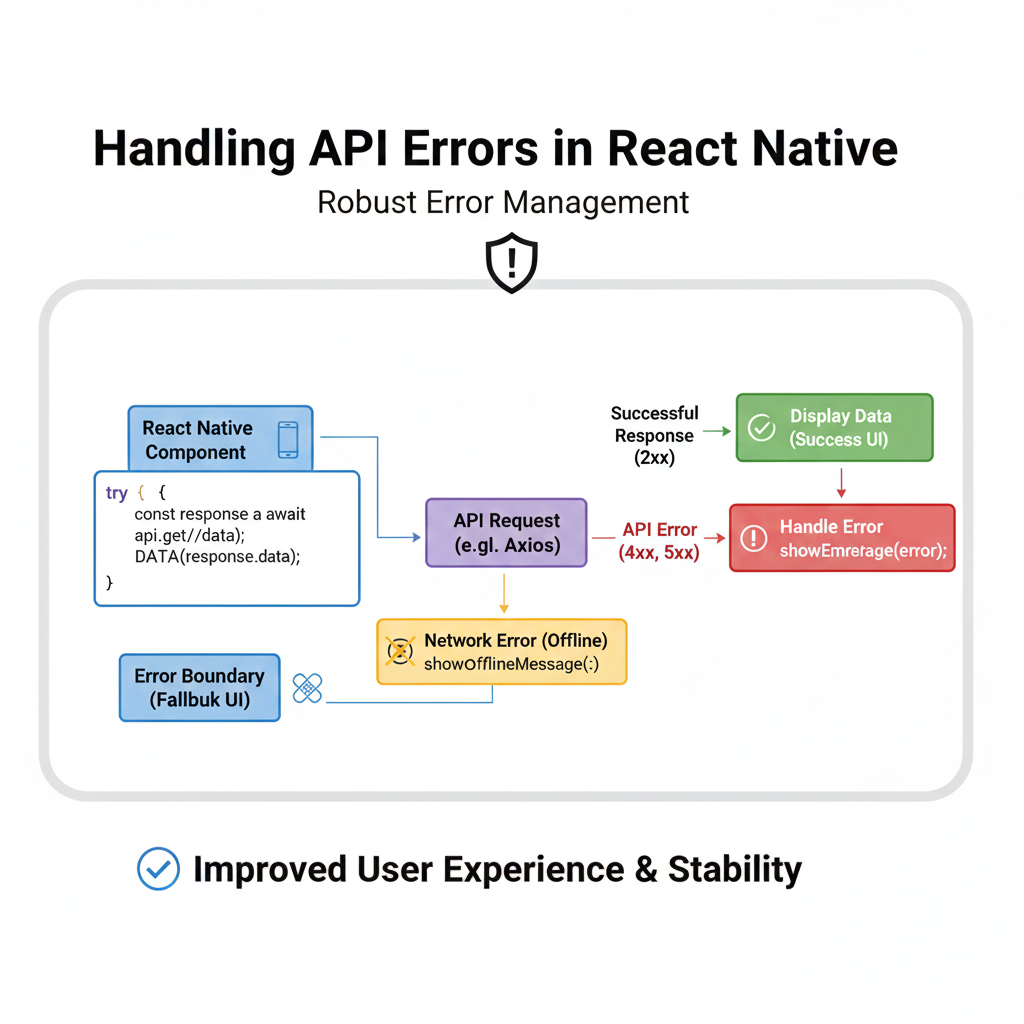
Struggling with API errors in React Native? This in-depth guide covers practical strategies, code examples, best practices, and tools to build resilient mobile apps. Level up your skills today.
Alright, let’s be real for a second. How many times have you been testing your slick new React Native app, everything’s looking fire, and then… bam. The screen goes blank. A weird spinner loops forever. Or worse, the app just crashes. You check the logs, and it’s the classic villain: an unhandled API error.
We’ve all been there. You’re fetching user data, posting a form, or updating a feed, and the backend decides to take a nap, returns a 500, or sends back data in a shape you never expected. In the world of mobile apps, where network conditions are as reliable as a weather forecast, not handling API errors isn't just an oversight—it’s a direct ticket to bad reviews and uninstalls.
So, let’s ditch the frustration. This isn’t just another theoretical lecture. This is your practical, step-by-step guide to transforming your React Native app from fragile to resilient. We’ll talk code, real-world scenarios, and the libraries the pros use. Let’s dive in.
Why Bother? The Cost of Ignoring Errors
Think about your own phone. You open an app, it shows a “Something went wrong” message, and you immediately close it. User trust is fragile. Proper error handling is UX superhero work. It’s about:
Retaining Users: Clear communication beats a frozen screen any day.
Debugging Faster: Structured errors help you pinpoint issues in minutes, not hours.
Professionalism: It shows you’ve built a robust, thoughtful product.
The Usual Suspects: Common API Error Types
Before we fix them, let's identify the enemies:
Network Errors: No internet, timeouts, DNS failures. The user might be on a subway.
HTTP Status Code Errors:
4xx (Client Errors):
400(Bad Request),401(Unauthorized),403(Forbidden),404(Not Found). Often, it’s something wrong with the request you sent.5xx (Server Errors):
500(Internal Server Error),502(Bad Gateway). The server is having a bad day.
Application/Data Errors: The request succeeds (200 OK!), but the response data is malformed, missing a key you need, or contains a custom business logic error (e.g.,
{ "error": "Insufficient balance" }).
Level 1: The Basics - fetch and try/catch
Most of us start with the built-in fetch. Here’s the naive way (that we all write first):
javascript
const loadData = async () => {
  const response = await fetch('https://api.example.com/data');
  const data = await response.json();
  setState(data); // Danger Zone!
};
This will explode if the network fails or the JSON is invalid. Let’s armor it up:
javascript
const loadData = async () => {
  setIsLoading(true);
  setError(null); // Reset errors on retry

  try {
    const response = await fetch('https://api.example.com/data');

    // Check if the HTTP request itself was successful (status 200-299)
    if (!response.ok) {
      // Throw a custom error with the status
      throw new Error(`HTTP error! status: ${response.status}`);
    }

    const data = await response.json();
    setState(data);
  } catch (err) {
    // Handle ALL the failures: network, HTTP, JSON parsing
    setError(err.message);
    // Maybe show an alert or a toast here
    Alert.alert("Request Failed", err.message);
  } finally {
    setIsLoading(false); // Runs regardless of success/failure
  }
};
Already better! We’re now catching network failures and HTTP errors. The finally block ensures our loading state stops no matter what. This is your absolute baseline.
Level 2: Going Pro with Axios and Interceptors
While fetch works, Axios is the popular choice for reasons. It has a cleaner syntax, automatic JSON transformation, and the superstar feature: interceptors.
Interceptors let you intercept requests or responses globally before they are handled by then or catch. This is where you centralize your logic.
bash
npm install axiosSetting up an Axios client with interceptors:
javascript
// services/apiClient.js
import axios from 'axios';
import { Alert, Platform } from 'react-native';

const apiClient = axios.create({
  baseURL: 'https://api.example.com',
  timeout: 10000, // 10 seconds
});

// Request Interceptor: Good for adding auth tokens
apiClient.interceptors.request.use(
  (config) => {
    const token = await getAuthToken(); // Your async function
    if (token) {
      config.headers.Authorization = `Bearer ${token}`;
    }
    return config;
  },
  (error) => {
    return Promise.reject(error);
  }
);

// Response Interceptor: Centralize error handling
apiClient.interceptors.response.use(
  (response) => response.data, // Just return the data on success
  (error) => {
    // Network error (no internet, timeout)
    if (!error.response) {
      Alert.alert("Network Error", "Please check your internet connection.");
      return Promise.reject({ message: 'Network Error' });
    }

    // Server responded with an error status
    const status = error.response.status;
    const message = error.response.data?.message || 'Something went wrong';

    switch (status) {
      case 401:
        // Redirect to login screen, clear storage
        Alert.alert("Session Expired", "Please login again.");
        navigate('Login');
        break;
      case 403:
        Alert.alert("Forbidden", "You don't have permission.");
        break;
      case 500:
        Alert.alert("Server Error", "Our servers are having issues. Try later.");
        break;
      default:
        Alert.alert(`Error ${status}`, message);
    }

    // Reject the promise so the specific component can also handle it if needed
    return Promise.reject(error.response.data);
  }
);

export default apiClient;
Now, in your components, API calls become clean and focused on business logic, not boilerplate error checks:
javascript
// In your component
import apiClient from '../services/apiClient';

const loadUserProfile = async () => {
  try {
    setIsLoading(true);
    const profile = await apiClient.get('/profile'); // Uses our configured client
    setUser(profile);
  } catch (err) {
    // Error is already shown via interceptor, but you can do component-specific handling here
    console.log("Component also knows about error:", err);
  } finally {
    setIsLoading(false);
  }
};
Level 3: The User Experience - UI/UX Patterns for Errors
Don’t just log errors. Show them with empathy.
Inline Errors: For form submissions, show errors next to the specific field.
Global Toast/Banner: For general API errors, use a toast (try
react-native-toast-message) or a banner at the top.Fallback Screens: For critical screens that fail to load, show a custom error screen with a retry button. React Query and SWR make this pattern easy.
Empty States: A list that fails to load shouldn’t just be blank. Show a friendly illustration and a “Try Again” button.
javascript
// A simple component state pattern
const [data, setData] = useState(null);
const [isLoading, setIsLoading] = useState(false);
const [error, setError] = useState(null);

const retryRequest = () => {
  setError(null);
  fetchData();
};

if (error) {
  return (
    <View style={styles.centered}>
      <ErrorIcon />
      <Text>{error.message}</Text>
      <Button title="Try Again" onPress={retryRequest} />
    </View>
  );
}
Pro-Tips & Best Practices (The Real Gold)
Simulate Errors: During development, use tools like Charles Proxy or browser dev tools to throttle the network and return failed responses. Test your error states!
Log for Diagnostics: Send critical error logs to a service like Sentry or Bugsnag. Include context like user ID, screen, and action.
Timeout Aggressively: Mobile users are impatient. Set reasonable timeouts (10-15 seconds).
Retry Strategically: Not all errors should retry. Use exponential backoff for 5xx errors or timeouts. Libraries like
axios-retrycan automate this.Validate Response Data: Use a runtime validation library like Zod to ensure the API response matches what your component expects. This catches sneaky data errors.
FAQs
Q: Should I use Redux/Context for error state?
A: For global, app-level errors (like “Session expired”), yes. For component-specific errors, local state is fine.
Q: What about offline-first apps?
A: That’s next-level. Look into React Query or SWR with persistent cache, and libraries like NetInfo to track connectivity and queue actions.
Q: Is fetch or Axios better?
A: Axios offers more out-of-the-box (interceptors, timeout, request cancellation). fetch is built-in but more bare-metal. For serious projects, Axios or React Query is often preferred.
Q: How do I handle file upload errors?
A: Use Axios’s onUploadProgress to track, and ensure you handle cancellations and network drops mid-upload.
Conclusion: Build Apps That Don’t Fear the Network
Handling API errors isn’t glamorous, but it’s what separates a hobby project from a professional, ship-worthy application. It’s a combination of solid technical strategies (interceptors, structured clients) and thoughtful user experience (clear messaging, recovery options).
Start by centralizing your error logic with an Axios client. Then, design meaningful UI states for loading, error, and success. Your users will thank you for the seamless experience, and you’ll thank yourself during debugging.
Ready to build production-ready applications from the ground up? Handling APIs is just one piece of the modern development puzzle. To learn professional software development courses such as Python Programming, Full Stack Development, and the MERN Stack (MongoDB, Express, React, Node.js) with in-depth modules on backend integration, error handling, and deployment, visit and enroll today at codercrafter.in. Transform your ideas into resilient, scalable applications.
Now go forth and make your React Native apps unbreakable.









