JWT Tokens Explained: Your Complete Guide to Modern API Authentication
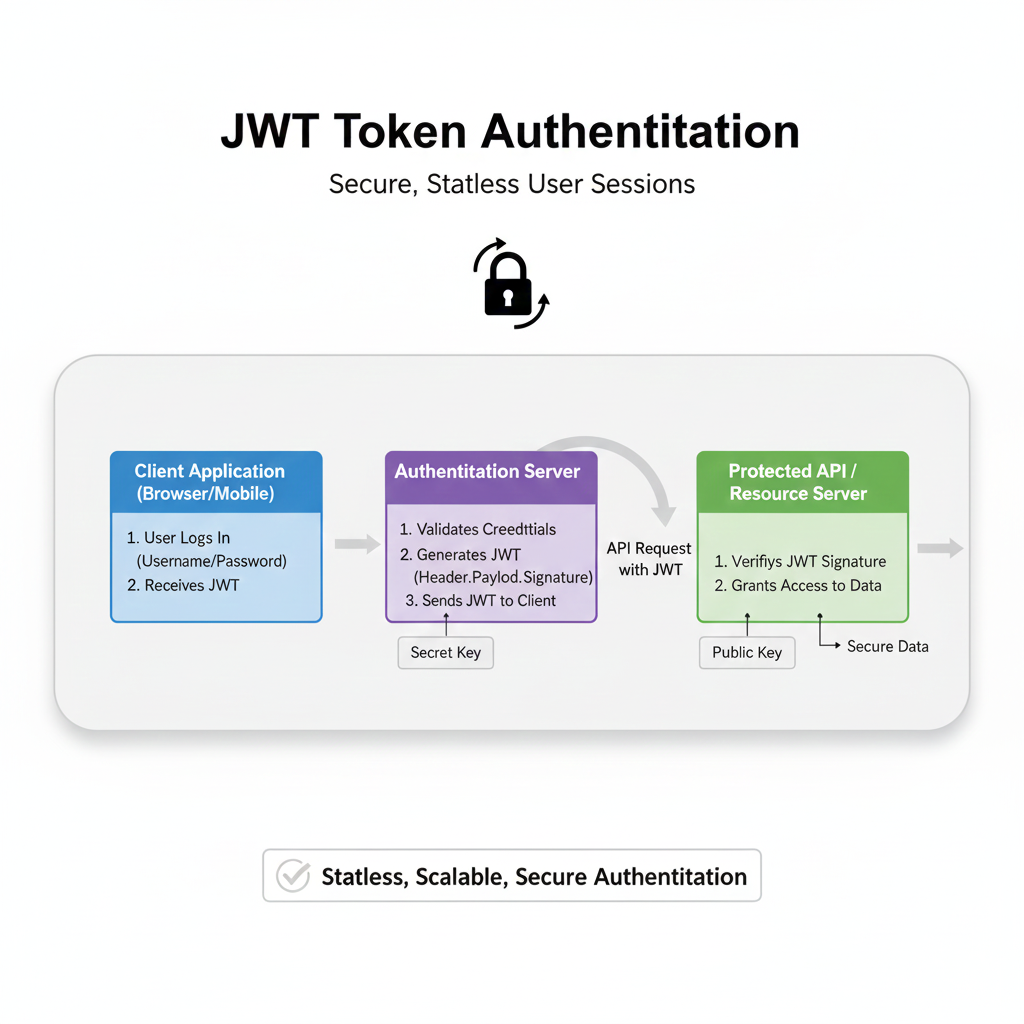
Tired of session cookies? Learn what JWT tokens are, how they work for authentication, their real-world use cases, and best practices. Master secure API access today.
Alright, let's talk about logging in. Not the "enter your password a million times" kind of frustration, but the magic that happens behind the scenes when you seamlessly switch from your laptop to your phone on Netflix, or when your food delivery app just knows it's you. That smooth, persistent experience? You can often thank a little thing called a JWT Token (pronounced "jot").
If you're a developer, you've definitely heard of it. If you're learning to be one, you need to understand it. It's not just a buzzword; it's the workhorse of modern web and mobile app authentication. So, let's break it down, sans the confusing jargon.
What on Earth is a JWT, Actually?
In the simplest terms, a JSON Web Token (JWT) is a compact, self-contained way to securely transmit information between parties as a JSON object. Think of it like a digital "club wristband."
Imagine you go to a multi-day festival. On day one, you show your ID and ticket at the gate (that's you logging in). The security guard verifies your credentials and puts a special, hard-to-forge wristband on you (that's the server issuing a JWT). For the rest of the festival, you don't need to show your ID and ticket at every single stall or tent. The wristband is the proof that you're allowed to be there. You just show your wristband (the JWT) to access different areas (protected API routes).
That's the core idea: Stateless Authentication. The server that protects your resources doesn't need to remember who logged in or keep a "session store." All the necessary info is right there in the token.
The Anatomy of a JWT: It's Just Three Pieces
A JWT is a string that looks like a random jumble of characters, like:xxxxx.yyyyy.zzzzz
It's actually three Base64Url-encoded strings, separated by dots.
Header (
xxxxx): This typically consists of two parts: the type of token (JWT) and the signing algorithm being used (like HMAC SHA256 or RSA).json
{
  "alg": "HS256",
  "typ": "JWT"
}
Payload (
yyyyy): This is the juicy part—the claims. Claims are statements about the user (and additional data). There are some standard claims likesub(subject, usually the user ID),exp(expiration time), andiat(issued at). But you can also put custom claims likeusernameorrole.json
{
  "sub": "1234567890",
  "name": "John Doe",
  "role": "admin",
  "iat": 1516239022,
  "exp": 1516242622
}
⚠️ Important Note: The payload is encoded, not encrypted. Anyone who gets the token can decode it and read the payload. Never put sensitive info (like passwords) in a JWT payload.
Signature (
zzzzz): This is the security guard. The server creates the signature by taking the encoded header, the encoded payload, a secret key (that only the server knows), and the algorithm specified in the header, and signing them all together.HMACSHA256( base64UrlEncode(header) + "." + base64UrlEncode(payload), secret )
This signature is why JWTs are trusted. If anyone tries to tamper with the header or payload (e.g., change the role from user to admin), the signature will become invalid. The server will immediately know the token has been messed with and reject it.
Real-World Use Cases: Where Do You See JWTs?
Everywhere. Seriously.
Single Sign-On (SSO): This is the big one. Log in with Google or Facebook on a third-party app? That's likely using JWT. You authenticate with the big provider (Google), they issue a JWT, and the smaller app trusts that token to let you in.
API Authentication: This is the bread and butter. Your frontend (React, Vue, Angular app) sends a username/password to the backend. The backend validates it and sends back a JWT. The frontend then stores that token (usually in localStorage or an HTTP-only cookie) and sends it in the header of every subsequent API request (
Authorization: Bearer <token>). The backend verifies the signature and, if valid, serves the data.Microservices Communication: In a complex system of microservices, one service might need to talk to another on behalf of a user. Instead of passing user credentials around, it can pass a JWT. The receiving service can verify the token and know exactly who the user is and what they're allowed to do.
Mobile Apps: JWTs are perfect for mobile. The app gets a token after login and uses it until it expires. It's much cleaner than dealing with traditional browser-based sessions.
Best Practices: Don't Shoot Yourself in the Foot
JWTs are powerful, but with great power comes great responsibility. Here’s how to use them safely:
Keep It Short-Lived: Issue tokens with a short expiration time (
expclaim). 15 minutes to an hour is common. This limits the damage if a token is stolen.Use Refresh Tokens: For a good user experience, implement a refresh token system. The access token (JWT) is short-lived. The refresh token is long-lived, stored securely on the server (in a database), and used solely to get a new access token when the old one expires. This allows users to stay logged in while maintaining security.
Store Tokens Securely:
In Web Apps: Avoid storing the JWT in
localStorageif you're highly concerned about XSS attacks. Using secure, HTTP-only cookies for the token is a more secure alternative, as they are not accessible via JavaScript. This is a nuanced debate with pros and cons on both sides.Always use HTTPS: No exceptions. Tokens are sent in plaintext; HTTPS encrypts the entire connection.
Validate Everything: On the server, always validate the token's signature, the
expclaim, theiss(issuer) claim, and any other relevant claims. Don't just decode it and trust it blindly.Keep the Payload Lean: The token is sent with every request. Don't bloat it with unnecessary user data. Just put the essentials needed for authorization (like
userId,role).
FAQs: The Stuff You're Actually Wondering
Q: What's the difference between JWT and session cookies?
A: Sessions are stateful. The server stores session data in memory or a database. The cookie just holds a session ID. JWTs are stateless; the token itself holds the data. JWTs are often better for scaling APIs and microservices.
Q: Can a JWT be revoked before it expires?
A: Not directly, because it's stateless. That's why short expiry is key. For immediate revocation, you need to implement a token blacklist (which checks a denied list on each request) or use a different, stateful mechanism.
Q: Are JWTs always the best choice?
A: No. For simple server-rendered websites, good old session cookies are often simpler and perfectly adequate. JWTs shine in API-driven architectures (like SPAs, mobile apps, microservices).
Q: Where do I store the JWT on the frontend?
A: As mentioned, it's a trade-off. localStorage is easy but vulnerable to XSS. HTTP-only cookies are safer from XSS but have their own considerations (like CSRF protection). The choice depends on your app's specific threat model.
Conclusion: Wrapping Your Head Around the Wristband
JWT authentication isn't some mythical beast. It's a practical, elegant solution to the problem of "how do I prove who I am across stateless systems?" By understanding its three-part structure, its signature-based security, and its ideal use cases, you can implement secure, scalable authentication in your projects.
Remember, it's a tool. Use it where it fits. Prioritize security with short-lived tokens, HTTPS, and proper storage. The world is moving towards API-first development, and JWT is a fundamental pillar of that world.
Ready to build secure, professional applications that use technologies like JWT authentication in real-world scenarios? Understanding theory is step one. Implementing it in a full-stack project is where the real learning happens. If you're looking to transition from basics to job-ready developer skills, structured guidance is key. To learn professional software development courses such as Python Programming, Full Stack Development, and MERN Stack, where you'll build projects with integrated authentication, API design, and more, visit and enroll today at codercrafter.in. We break down complex topics like this into actionable, hands-on learning.
P.S. Play around with JWT debugging at jwt.io – it's the best way to see the header, payload, and signature in action!









