How React Native Works Internally: A 2025 Deep Dive into JSI, Threads & The New Architecture
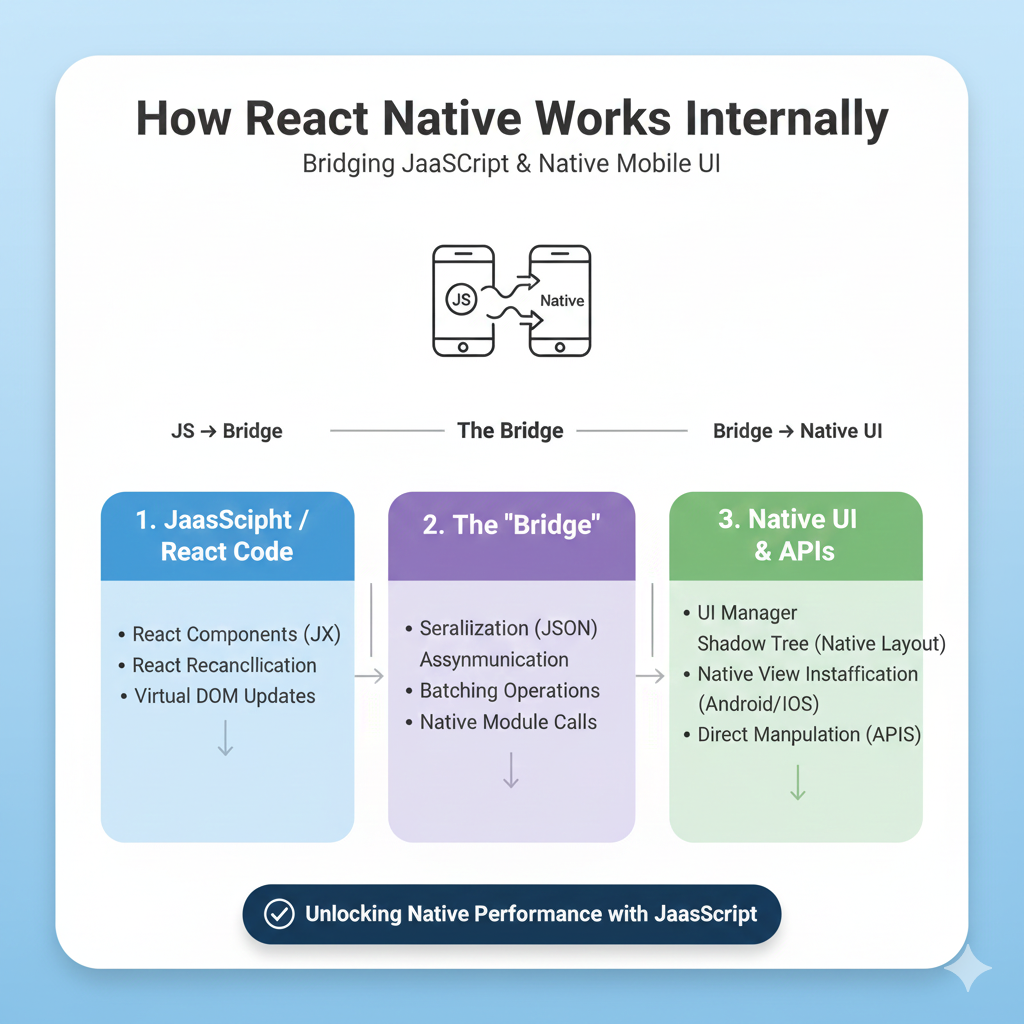
Ever wonder how JavaScript becomes a native app? We break down React Native's internal architecture—the JS thread, UI thread, JSI bridge, and new concurrent features—with examples and best practices for developers.
Beyond "Write Once, Run Anywhere": The True Native Bridge
Ever wondered how your sleek JavaScript and React code magically transforms into a native iOS or Android app that feels at home on any device? You're not alone. As developers, we use tools like React Native every day, but the inner workings often seem like wizardry. Let's pull back the curtain.
At its core, React Native isn't about webviews or simple translations. It's a sophisticated system of communication that connects the world of JavaScript to the native platform. This connection is what makes an app built with JavaScript feel indistinguishable from one built with Swift or Kotlin. The framework essentially acts as a powerful interpreter, translating your component-based UI logic into instructions the phone's native operating system can understand and render natively.
The key to understanding React Native's efficiency is the concept of threads. Your app doesn't run in one single process. Instead, it cleverly splits the work across specialized threads for optimal performance.
The Three Major Players Under the Hood
The JS Thread: This is your domain—where all your application's JavaScript logic lives. Your components, state management, API calls, and event handlers execute here.
The UI (Main) Thread: The phone's star performer. This thread is solely responsible for painting pixels on the screen. It handles the final, native UI rendering.
The Native Modules Thread: This is the specialist. When your app needs to access the device's camera, GPS, or file system, this thread calls the platform-specific code written in Java/Kotlin or Objective-C/Swift.
These threads can't work in isolation. They need a communication channel, and for years, this was handled by The Bridge—a crucial piece of architecture that facilitated asynchronous communication between the JS and Native sides. It was reliable but had its limits, often requiring data to be serialized (converted to a common format like JSON) for transfer, which could become a bottleneck for high-frequency operations.
The New Architecture: Turbocharging the Bridge with JSI
To address these limitations, the React Native team has been rolling out a transformative New Architecture since version 0.68, and it's now the default as of 2025. This is where things get even more impressive. The core upgrade is the replacement of the old asynchronous bridge with the JavaScript Interface (JSI).
Think of JSI as removing the middleman. Instead of passing serialized messages, JSI allows JavaScript to hold a direct reference to a C++ object in native memory, and vice-versa. This enables synchronous, direct method invocation.
The Impact? Real-world performance unlocks that were previously impossible. The React Native team highlights that a popular camera library like VisionCamera can now process ~30MB video frames in real-time using JSI, whereas the serialization costs of the old bridge would have made this prohibitively slow.
Here’s a comparison that shows how the new architecture fundamentally changes the communication model:
Building a Smoother UI: The Power of Concurrency
The New Architecture also fully integrates React 18's Concurrent Features. This gives you, the developer, powerful new tools. Ever had a UI "jump" because a tooltip or layout had to adjust after rendering? The New Architecture's synchronous layout capabilities allow you to measure and adjust UI elements in a single commit, eliminating that visual hiccup.
You can also prioritize updates. Need to ensure a slider stays responsive while hundreds of tiles render? Wrap the tile-rendering state update in startTransition to mark it as a lower-priority update that can be interrupted, keeping your UI buttery-smooth.
jsx
// Using the new concurrent features for a smoother UI
<Slider
  onValueChange={(newValue) => {
    startTransition(() => { // Lower priority update
      setNumberOfTiles(newValue); // Can be interrupted for high-pri tasks
    });
  }}
/>
Who's Betting on React Native?
This isn't just experimental tech. The new architecture is proven at scale, powering production apps at Meta, Microsoft, Shopify, and Wix. Companies like Shopify build all of their mobile apps with React Native, citing the benefits of a single, unified codebase and team. Microsoft even extends it to target desktop experiences with React Native for Windows and macOS.
Building for This Future: A Developer's Checklist
Understanding the architecture helps you write better code. Here are key best practices to align your development with React Native's strengths:
Embrace Functional Components & Hooks: They're the modern standard, leading to simpler, more reusable code and better compatibility with concurrent features.
Optimize Thread Communication: Be mindful of what you put on the JS thread. Heavy computations can block it, making your UI feel sluggish. Use
React.memoand optimized lists (FlatList,SectionList) to minimize unnecessary re-renders.Structure for Maintainability: Separate your styles from component logic. Use a state management library like Redux or Context API for predictable global state. Organize your project with clear aliases to avoid messy import paths.
Test on Real Devices: The UI thread renders natively, so always test on both iOS and Android simulators and physical devices to catch platform-specific quirks.
Want to master these patterns and build production-ready apps? At CoderCrafter, we don't just teach syntax—we teach architecture. Our Full Stack Development and MERN Stack courses dive deep into these concepts, showing you how to structure scalable, high-performance applications from the ground up. Visit and enroll today at codercrafter.in to transform your theoretical knowledge into professional-grade skills.
FAQ: Your React Native Questions, Answered
Q: Is React Native truly "native"?
A: Yes, but with a caveat. It doesn't compile JavaScript to native code. Instead, it runs a JavaScript engine and uses a bridge (or JSI) to communicate with actual native UI components (like UIView on iOS). The user sees and interacts with real native elements, not web approximations.
Q: When should I avoid React Native?
A: It's less ideal for apps requiring complex, custom native animations or graphics (like high-end games), or for apps that need to use many platform-specific APIs not yet supported by the community. In these cases, pure native development might be more efficient.
Q: How do I handle platform-specific code?
A: React Native provides the Platform module. You can conditionally execute code with Platform.OS === 'ios', or even better, create separate files like Button.ios.js and Button.android.js—React Native will automatically pick the correct one.
Q: What's the biggest current challenge?
A: While the New Architecture (JSI) solves many issues, its rollout means some third-party libraries may need updating. The ecosystem is rapidly adapting, but it's something to check when starting a new project.
The Bottom Line
React Native's architecture is a brilliant engineering compromise. It trades a minuscule amount of overhead for massive gains in developer productivity, code reuse, and maintainability. With the New Architecture and JSI, that overhead is shrinking to near-zero for most tasks.
The framework empowers you to think about your app's logic and user experience, while it handles the complex translation to the native world. For the vast majority of consumer and business applications—from social media feeds to e-commerce stores—it provides the perfect blend of speed, quality, and development efficiency.
Ready to stop just using tools and start truly understanding them? Deep architectural knowledge is what separates hobbyists from senior engineers. If you're looking to build that deep, practical expertise, from the JavaScript thread all the way down to native modules, structured learning is the fastest path. To learn professional software development courses such as Python Programming, Full-Stack Development, and MERN Stack, visit and enroll today at codercrafter.in. Let's build your future in code.









