Firebase Authentication Guide 2025: Secure Logins Made Simple
Master Firebase Auth in 2025. Our in-depth guide covers setup, real-world examples, best practices & pitfalls. Build secure apps faster. Learn more at Coder Crafter.
Hey there, fellow devs and creators! 👋 Let's be real – building an app is tough enough without having to worry about how to securely manage user logins, passwords, and all that sensitive data. That's where Firebase Authentication swoops in like a superhero. In this deep dive, we’re breaking down everything you need to know about Firebase Auth, from the basic "what is it" to pro-level tips and real-world hacks. No jargon, no fluff – just straight-up useful info.
So, What Exactly is Firebase Authentication?
In the simplest terms, Firebase Authentication is a back-end service provided by Google (through Firebase) that handles all the messy, complicated parts of user authentication for you. Think of it as your dedicated security guard who manages logins, sign-ups, password resets, and even social media logins (like "Sign in with Google" or "Login with Facebook").
Instead of building your own authentication system from scratch – which is risky, time-consuming, and let's face it, kind of a pain – Firebase Auth gives you a ready-made, secure, and scalable solution. It integrates directly with other Firebase services (like Cloud Firestore or Realtime Database) and even works seamlessly with your custom back-end.
Why Should You Even Care?
Because user trust is everything. A single security flaw can destroy your app's reputation overnight. Firebase Auth is built on Google's infrastructure, meaning it comes with battle-tested security practices most of us couldn't dream of implementing alone.
How It Actually Works: No Magic, Just Smart Design
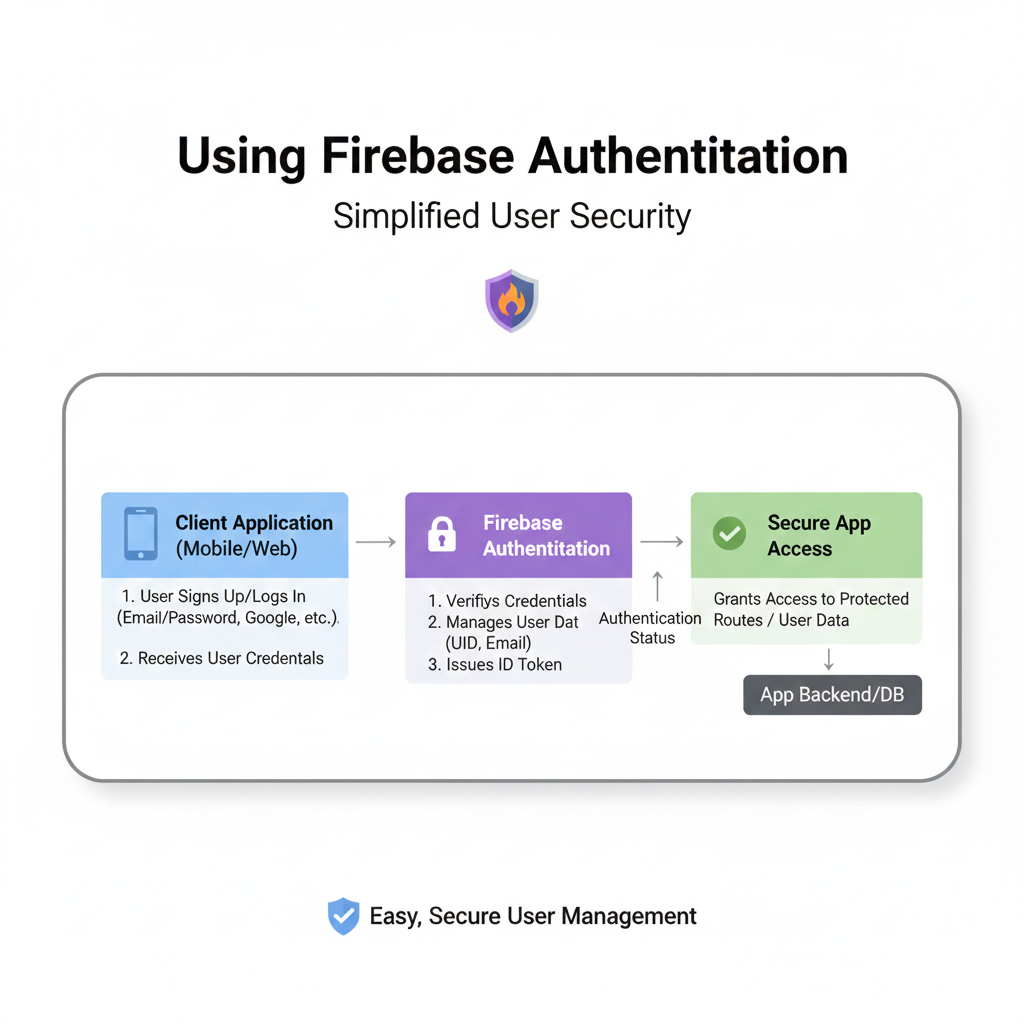
Here's the typical flow when a user signs up for your app using Firebase Auth:
User Action: A user enters their email/password or clicks "Sign in with GitHub" in your app.
Request to Firebase: Your app (the client) sends this info to Firebase's servers.
Verification & Token Generation: Firebase verifies the credentials. If it's a social login, it talks to that provider (like Google). Once verified, it creates a secure JSON Web Token (JWT).
Token to Client: This JWT is sent back to your app.
Access Granted: Your app uses this token to prove the user's identity to your database or backend on every request.
The beauty? You never handle raw passwords directly. Firebase does the heavy lifting.
Real-World Use Cases: It's Everywhere!
You've probably used Firebase Auth today without even knowing it. Here’s where it shines:
Social Media Apps: Quick onboarding with Instagram or Twitter login to pull profile info.
E-commerce Platforms: Secure email/password logins for saving addresses and order history.
SaaS Products: Multi-tenancy support, where different companies can have their own user pools.
On-Demand Services (Uber/Delivery apps): Phone number authentication for fast, no-email-required signups.
Mobile Games: Anonymous authentication first, letting players try the game, then linking to a permanent account later.
Getting Your Hands Dirty: A Quick Example
Let's say you're building a React app and want to add "Sign in with Google."
Set up Firebase: Create a project in the Firebase Console, register your app, and get your config object.
Install SDK:
npm install firebaseInitialize & Implement:
javascript
import { initializeApp } from 'firebase/app';
import { getAuth, signInWithPopup, GoogleAuthProvider } from 'firebase/auth';

const firebaseConfig = { /* Your config here */ };
const app = initializeApp(firebaseConfig);
const auth = getAuth(app);

const handleGoogleSignIn = async () => {
  const provider = new GoogleAuthProvider();
  try {
    const result = await signInWithPopup(auth, provider);
    const user = result.user; // You've got your user object!
    console.log("Welcome, ", user.displayName);
  } catch (error) {
    console.error("Sign-in failed", error.message);
  }
};
Boom! In less than 20 lines, you have a production-ready Google sign-in.
Level Up: Best Practices You Can't Ignore
Always Use State Listeners: Use
onAuthStateChanged(auth, callback)to reliably track if a user is logged in or out across page refreshes.Secure Your Backend: Always verify the Firebase ID token on your server before processing sensitive requests.
Enable Multi-Factor Authentication (MFA): For apps dealing with financial or health data, MFA is a must. Firebase supports it.
Leverage Custom Claims: Need to define user roles (like
adminorpremium)? Use custom claims stored in the ID token for easy, secure role-based access control.Link Multiple Auth Providers: Let users merge their accounts. Someone might sign up with email, then later want to link their Google account for easier login.
Handle Errors Gracefully: Don't just show "Error 400." Use Firebase's error codes to give user-friendly messages: "This email is already in use" or "Password is too weak."
The Not-So-Obvious Pitfalls (Learn From My Mistakes)
Development vs Production: The Authentication settings (like authorized domains) are different. Double-check them before going live.
LocalStorage vs SessionStorage: Where you store the token matters for UX and security. For most web apps,
localStorageis fine, but be aware of XSS risks. For high-security apps, consider secure, HTTP-only cookies via your backend.Costs at Scale: Firebase Auth has a free tier, but extensive phone authentication usage can incur costs. Keep an eye on your usage.
FAQs – Stuff You Actually Want to Know
Q: Is Firebase Auth really free?
A: Yes, for most standard use cases! The free "Spark" plan is generous for email/password and social logins. Phone authentication has free limits, then pay-as-you-go.
Q: Can I use it with my own Node.js/ Python backend?
A: 100% yes. Send the ID token from your frontend to your backend, then use the Firebase Admin SDK to verify it. It’s the standard practice.
Q: What if Google shuts down Firebase?
A: It's a valid concern, but Firebase is a core Google Cloud Platform product. Migration would be a headache, but you can export user data with the Auth export feature.
Q: How does it compare to Auth0 or Supabase Auth?
A: Firebase Auth is fantastic for Google-centric ecosystems and getting started fast. Auth0 offers more enterprise identity providers. Supabase Auth gives you a PostgreSQL database directly. Choose based on your stack.
Q: Can I customize the email templates for password reset?
A: Absolutely! Go to your Firebase Console > Authentication > Templates to brand them and improve user experience.
Conclusion: Why This is a Game-Changer
Firebase Authentication removes one of the biggest hurdles in modern app development. It lets you focus on building your app's core features instead of sweating over password hashing, email verification flows, or OAuth protocols. It's secure, scales with you, and integrates with a powerful suite of other tools.
Whether you're a solo founder building an MVP or part of a team scaling a product, mastering Firebase Auth is a skill that pays off immediately. It’s the reliable foundation your user system needs.
Ready to build secure, professional-grade applications? This is just one piece of the modern development puzzle. To learn professional software development courses that cover backend architecture, frontend frameworks, and integrating services like Firebase in real projects, check out Coder Crafter. We offer hands-on courses in Python Programming, Full-Stack Development, and the MERN Stack that take you from basics to building deployable apps. Visit and enroll today at codercrafter.in.
Got questions or your own Firebase Auth tips? Drop them in the comments (on our site)! Let's keep the conversation going. 🚀









