Tired of polling? Learn how to build a modern, scalable chat application using WebSockets. Step-by-step guide, real-world use cases, best practices, and code examples included. Level up your skills with CoderCrafter.in's professional courses.
Let’s be real for a second. How many of your daily apps feel alive? Notifications pop up instantly. Messages appear the millisecond your friend hits send. Uber shows your driver creeping closer in real-time. This magic, this feeling of a live, breathing connection, isn’t magic at all. It’s often the work of a technology called WebSockets.
And today, we’re not just going to talk about it. We’re going to demystify it. We’re going to build the mental (and a bit of actual) blueprint for a modern chat application. No more fake "typing..." indicators that update only when you refresh. We’re doing it for real.
The "Before": Why the Old Ways Feel So Clunky
To get why WebSockets are a big deal, remember the old way. Traditionally, web apps used HTTP, which is like ordering pizza. You (the client) call up (send a request), ask for a pizza (data), hang up, and wait. The restaurant (server) prepares it and delivers (sends a response). To see if your friend sent a message, your app had to keep calling the server every few seconds—"Any new messages? How about now? Now?" This is called polling. It’s inefficient, slow, and a total battery/data drain. It’s like calling the pizza place every 10 seconds to ask if it's ready.
Then came long-polling, a slight upgrade where the server just holds the call open until it has something to say. Better, but still not a true, persistent connection.
Enter the hero: WebSockets.
What Are WebSockets, Actually?
In simple terms, a WebSocket is a persistent, full-duplex communication channel that operates over a single, long-lived TCP connection. Whoa, jargon alert. Let's translate.
Imagine you and your friend dig a secret tunnel between your houses. Once it’s open, you can send notes (data) back and forth anytime, instantly, without having to run outside and knock on the door every time. The tunnel is always open.
Persistent: The connection stays open until someone closes it.
Full-Duplex: Both client (your browser) and server can send data independently, at the same time. Talk and listen simultaneously, like a phone call.
Low Latency: Almost no delay. The data flies through the open tunnel.
The process starts with a traditional HTTP handshake that says, "Hey, let's upgrade this connection to a WebSocket." Once both parties agree, the protocol switches, and the real-time party begins.
Building Our Chat App: The Key Components
Let’s break down what we actually need to build. We'll keep the stack modern and approachable.
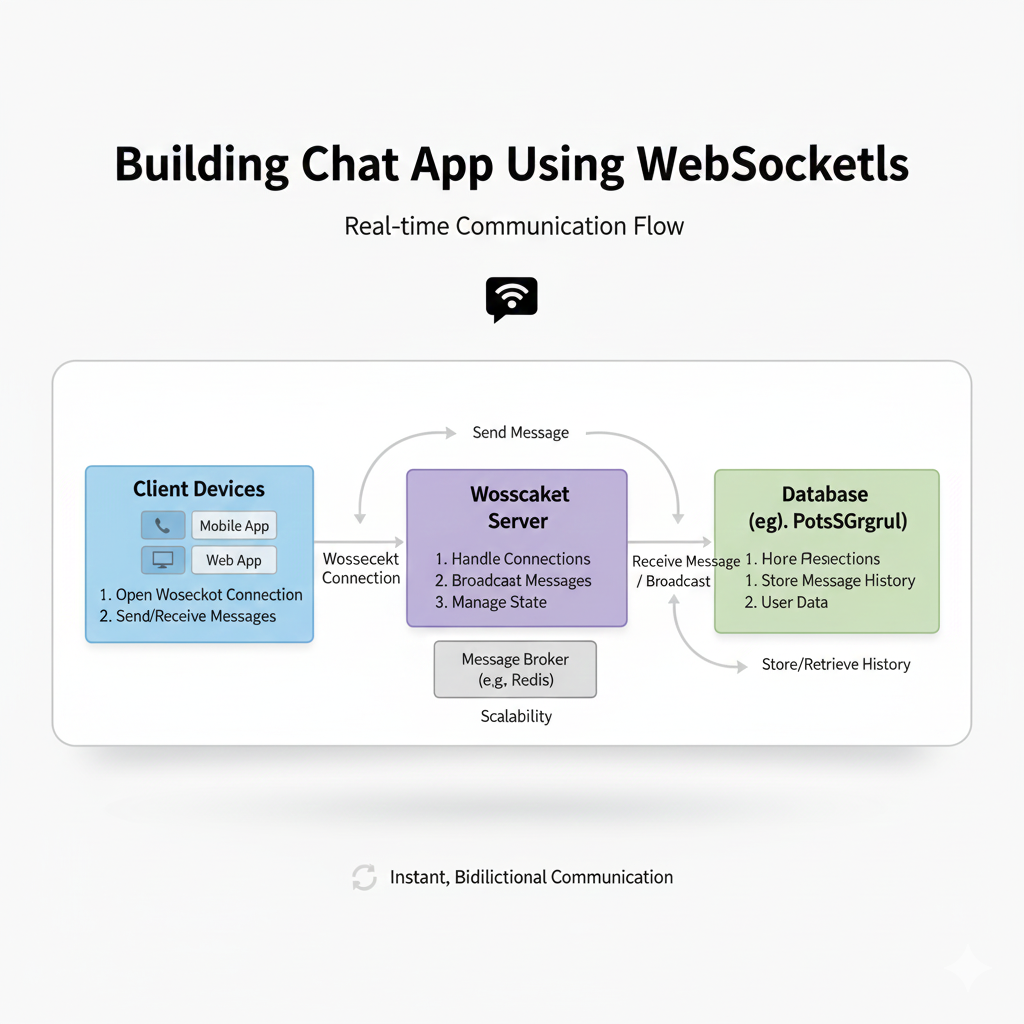
1. The Backend (The Brain & The Bouncer):
This is your server. Its jobs are:
Manage all active WebSocket connections (who's online?).
Receive a message from User A.
Figure out who it’s for (a specific user, a group).
Instantly relay (or broadcast) that message to the correct recipient(s).
We'll use Node.js with Express and Socket.io. Why Socket.io? It’s the superstar library that makes WebSockets ridiculously easy. It handles the fallbacks (if a browser doesn’t support WebSockets, it can use polling) and provides a clean event-based API.
A Tiny Taste of Server-Side Code (Conceptual):
javascript
// Server - using Socket.io
const io = require('socket.io')(server);

io.on('connection', (socket) => {
  console.log('A user connected: ' + socket.id);

  // Listen for a 'chat message' event from this client
  socket.on('chat message', (data) => {
    // Broadcast to everyone except the sender
    socket.broadcast.emit('chat message', data);
    // Or, to send to a specific room: io.to(roomId).emit(...)
  });

  socket.on('disconnect', () => {
    console.log('User disconnected');
  });
});
2. The Frontend (The Interface):
This is your HTML/JS chat window. Its jobs are:
Connect to the server's WebSocket.
Take user input, package it as a message, and
emitit to the server.Listen for incoming messages from the server and display them.
3. The Data Flow (The Conversation):
You type "Hey!" and hit send.
Frontend emits a
'chat message'event with the data{text: "Hey!", user: "You"}.Server receives it via the
socket.on('chat message')listener.Server instantly broadcasts it to all other connected clients using
socket.broadcast.emit().Your friend's frontend receives the event and appends the message to their chat window.
Boom. Real-time.
Real-World Use Cases: It’s Not Just Chat
Chat apps are the classic example, but once you grasp WebSockets, you see them everywhere:
Live Dashboards: Stock tickers, live sports scores, analytics (think Google Analytics live view).
Collaboration Tools: Google Docs showing live cursor positions and edits from others.
Multiplayer Gaming: Every move your opponent makes transmitted instantly.
Live Location Tracking: Uber, food delivery apps.
Notifications: The little red badge that updates without you pulling down to refresh.
Best Practices & Pro Tips
Building a toy app is one thing. Making it robust is another.
Use a Library (Seriously): Use Socket.io or SockJS. They handle reconnections, fallbacks, and heartbeats automatically. Don't try to roll your own WebSocket layer from scratch for production.
Authentication: Don't let just anyone connect. Authenticate during the initial HTTP handshake (using JWTs, for example) before upgrading to WebSocket.
Room Management: For group chats, use the concept of "rooms." Users
joina room, and you can broadcast to everyone in that room. Socket.io makes this trivial withsocket.join(roomId).Handle Disconnections: The internet is flaky. Your code must gracefully handle
disconnectandreconnectevents. Libraries help, but plan for it.Scale Smartly: A single Node.js server can handle many connections, but for massive scale (think 100k+), you need multiple servers. This introduces a new problem: a user connected to Server A needs to get a message from a user on Server B. You'll need an adapter like the Socket.io Redis adapter to help servers communicate.
FAQs: Stuff You Might Be Wondering
Q: Is WebSocket a replacement for HTTP?
A: Nope. They're partners. Use HTTP for traditional page loads, form submissions, and RESTful APIs. Use WebSockets for the persistent, real-time layer.
Q: Are there costs/drawbacks?
A: The main cost is server resources (maintaining many open connections). Complexity also increases compared to a simple request/response app. But for features that need to be live, it's 100% worth it.
Q: Can I use it with React, Vue, or Angular?
A: Absolutely! The frontend code we discussed runs perfectly within any frontend framework. You'd typically set up the Socket connection in a central service or context.
Q: How do I get started for real?
A: Start with the Socket.io get-started guide. It’s fantastic. Build their simple chat, then start adding features: usernames, rooms, typing indicators ("User is typing...").
Conclusion: Your Gateway to "Live"
Building a chat app with WebSockets is more than a weekend project. It's a gateway into the architecture of the modern, live web. You're no longer just building static pages; you're creating living, data-pulsing experiences.
The concepts you learn here—event-driven programming, real-time data flow, connection management—are directly transferable to building the next generation of interactive web applications.
The journey from a beginner coder to a professional developer who can architect such systems is incredibly rewarding. If this deep dive sparked your curiosity and you want to master not just WebSockets but the entire full-stack landscape—from Python for backend logic to building complete applications with the MERN Stack (MongoDB, Express, React, Node.js)—you need structured, project-based learning.
To learn professional software development courses such as Python Programming, Full Stack Development, and MERN Stack, visit and enroll today at codercrafter.in. We break down complex topics like these into manageable, career-ready skills. And hey, while you're there, check out our developer tools, like our handy CMYK to RGB color converter, perfect for your next web design project.
So, what are you waiting for? Open your IDE, start that Node.js server, and build something that feels alive. The real-time web is waiting for you.