PayPal Integration Guide 2025: How to Add Payments to Your Site
Want to accept payments online? Our detailed 2025 guide explains PayPal integration for beginners & developers. Learn APIs, use cases, & best practices. Start getting paid!
Let’s be real. In today’s digital world, if your website can’t take payments smoothly, you’re basically leaving money on the table. And when we talk about online payments, one name is practically synonymous with the whole game: PayPal. Whether you’re a solo entrepreneur launching a dropshipping store, a developer building the next big SaaS platform, or a freelancer just trying to get paid, integrating PayPal can be the difference between a hobby and a real business.
But "integrate PayPal" sounds kinda technical and scary, right? Don’t worry. We’re breaking it all down—no jargon, just straight talk. This is your no-BS guide to understanding PayPal integration, why it's a game-changer, and how to do it right.
What Exactly Is PayPal Integration?
In simple terms, PayPal integration is the process of connecting PayPal's payment system to your website or app so you can accept payments. It’s the digital bridge between your "Buy Now" button and your bank account.
Think of it like this: You build the awesome online storefront (your website), but you need a trusted, secure cashier to handle the money. PayPal becomes that cashier. Integration is you hiring them and giving them a spot at your checkout counter.
This isn't just about slapping a button on your site. Modern integration involves APIs (Application Programming Interfaces)—which are basically sets of rules that let your website talk directly to PayPal's systems. This communication handles everything: showing the payment form, processing the transaction, confirming the payment to you, and even handling refunds.
Why Bother? The Real-World Perks
So why does everyone from Etsy sellers to massive corporations use PayPal?
Trust Factor: That PayPal logo is instant credibility. People trust it with their financial info, which means they’re more likely to complete a purchase on your new, unfamiliar site.
Speed & Convenience: Customers can pay with their PayPal balance, bank account, or credit/debit cards without manually entering details every time. "Check out with PayPal" is famously fast.
Global Reach: It works in over 200 markets and accepts payments in 25+ currencies. Your local business just went global.
Security You Don’t Have to Manage: PayPal handles all the PCI DSS compliance (the super strict security standards for card data). That’s a huge burden off your shoulders.
Built-in Buyer & Seller Protection: This reduces disputes and builds confidence on both sides of the transaction.
Real-World Use Cases: It's Not Just for eBay Anymore
The Online Store (E-commerce): This is the classic. Platforms like Shopify or WooCommerce have plugins, but custom integration lets you control the entire flow—customized checkout pages, post-purchase redirects to a "Thank You" page, and automatic order updates.
The SaaS (Software-as-a-Service): Need recurring revenue? PayPal handles subscriptions beautifully. Think monthly plans for your project management tool, graphic design software, or membership site.
The Freelancer or Consultant: Sending professional, itemized invoices directly through PayPal gets you paid faster than a bank transfer. Integration can automate this from your own client portal.
The Donation-Based Non-Profit or Creator: A "Donate with PayPal" button on your blog, YouTube channel, or Twitch stream makes it effortless for supporters to chip in.
The Event Ticketing Site: Sell tickets for your webinar, workshop, or local meetup. PayPal can handle the rush without crashing.
Your Toolbox: How to Actually Integrate PayPal
Here’s where the rubber meets the road. PayPal offers a few main ways to integrate, depending on how much control and customization you need.
1. PayPal Buttons (The Quick & Easy Route)
Perfect for beginners. You literally go to PayPal’s website, use their button builder, copy a snippet of HTML code, and paste it where you want the button. It’s great for single items, donations, or simple subscriptions. Zero coding required, but also zero customization.
2. PayPal Standard Checkout
This is the common "PayPal Checkout" flow. The customer clicks your checkout button, gets redirected to PayPal's website to complete the payment, and then returns to your site. It’s secure and reliable, but the user leaves your site momentarily.
3. PayPal REST APIs (The Developer’s Playground)
This is the powerful, flexible method for custom websites and apps. Using PayPal’s APIs, you can create a fully seamless checkout experience where the user never leaves your site. This is what the big players use.
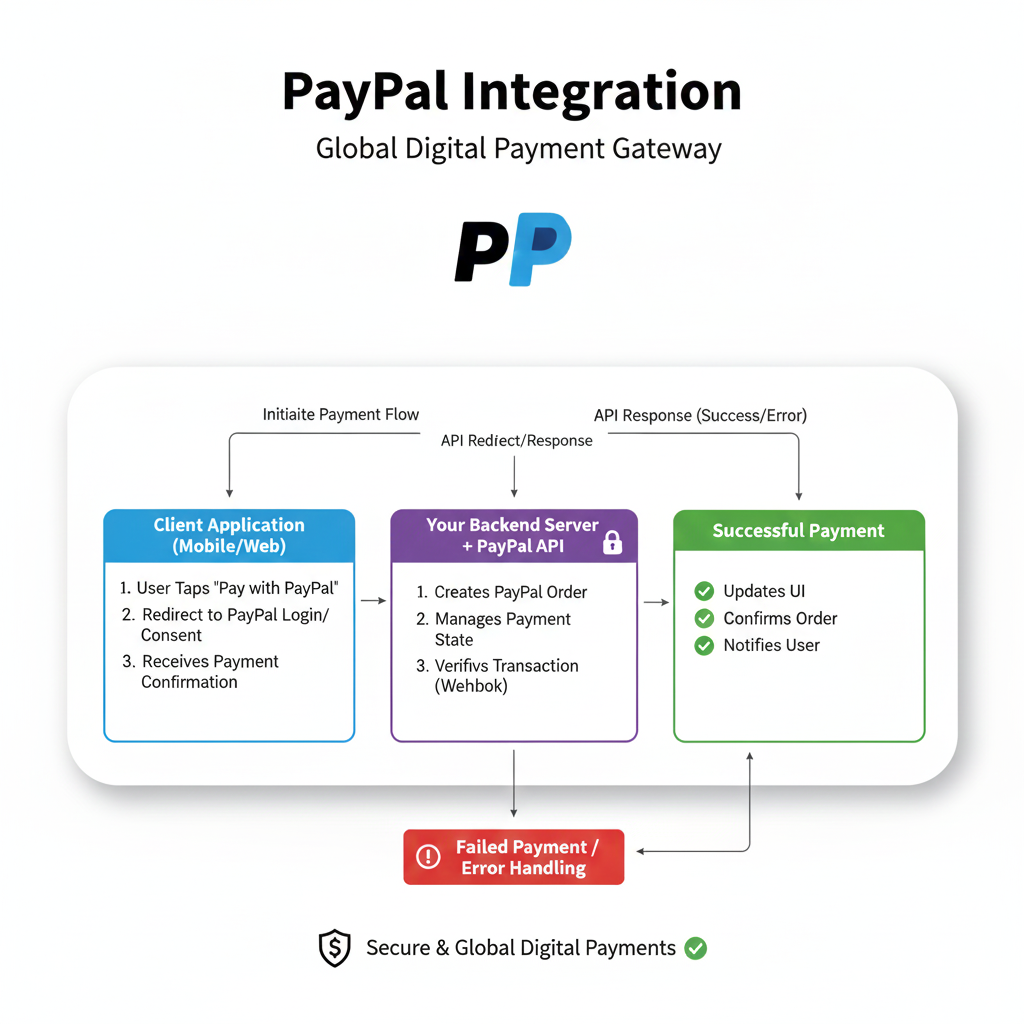
The Basic Flow with APIs looks like this:
Create an Order: Your website's backend calls PayPal's API to create a payment order with the amount and details.
Approve the Order: The user approves and pays on a smart payment window embedded in your site.
Capture the Payment: Once approved, your backend securely captures the payment.
Confirm & Deliver: You show a success message and provide the product or service.
javascript
// A super simplified conceptual example
paypal.Buttons({
  createOrder: function(data, actions) {
    return actions.order.create({
      purchase_units: [{
        amount: {
          value: '49.99' // Your item price
        }
      }]
    });
  },
  onApprove: function(data, orderID) {
    // Capture the payment on your server
    return fetch('/your-capture-server', {
      method: 'post',
      body: JSON.stringify({ orderID: orderID })
    }).then(function(res) {
      // Show a success message to the buyer
      alert('Payment completed successfully!');
    });
  }
}).render('#paypal-button-container');
Best Practices for a Smooth Payment Experience
Always Use SSL/TLS (HTTPS): This is non-negotiable. It encrypts data and is required by PayPal for API integration.
Implement Webhooks: Don’t just rely on the user returning to your site. Webhooks are PayPal’s way of instantly notifying your server about payments, refunds, or disputes, even if the user closes the browser.
Test Extensively with Sandbox: PayPal provides a complete sandbox (test) environment with fake money. Never test with real funds. Create seller and buyer test accounts and simulate every possible scenario.
Design a Clear Post-Payment Flow: Where does the user go after paying? A clear "Order Confirmed" page with next steps and a receipt email is crucial.
Stay Updated: PayPal's APIs and security standards evolve. Keep your integration updated to avoid breaking changes.
FAQs: Stuff Everyone Wants to Know
Q: How much does it cost to integrate PayPal?
A: Integration itself is free. PayPal makes money on transaction fees (typically 2.99% + a fixed fee per transaction in the US). Always check their latest merchant fees.
Q: Do I need a business account?
A: For e-commerce, yes. A PayPal Business account gives you access to all the tools, APIs, and professional features.
Q: Is coding knowledge mandatory?
A: For basic buttons, no. For a custom, seamless checkout using APIs, yes, absolutely. You need solid backend development skills.
Q: Can I use it with mobile apps?
A: 100%. PayPal has dedicated SDKs for iOS and Android to integrate native payment flows into your apps.
Q: What about security and fraud?
A: PayPal has robust fraud protection tools. However, you should still implement standard practices on your end, like validating orders and using PayPal's recommended security headers and webhooks for verification.
Wrapping It Up: Your Gateway to Getting Paid
Integrating PayPal isn't just a technical task; it's a business decision. It opens up a world of trusted, global payments and can significantly boost your conversion rates. Start simple if you need to, but understand the power of a fully custom integration for scaling your vision.
Building this kind of secure, real-world functionality is what separates a basic website from a professional web application. It’s the kind of skill that makes you incredibly valuable as a developer.
Ready to build the skills to create not just websites, but full-fledged, revenue-generating web applications? This is where professional training makes all the difference. To learn professional software development courses such as Python Programming, Full Stack Development, and MERN Stack, visit and enroll today at codercrafter.in. We’ll take you from fundamentals to building complex, integrated systems like this one.
And hey, if you're tinkering with web design for your new project, check out our handy developer tools, like our CMYK to RGB Color Converter, to get your visuals just right.
So go ahead, implement that payment gateway, and turn your next click into a celebratory "cha-ching!"









