Lottie Animation Integration: Complete Guide for Developers
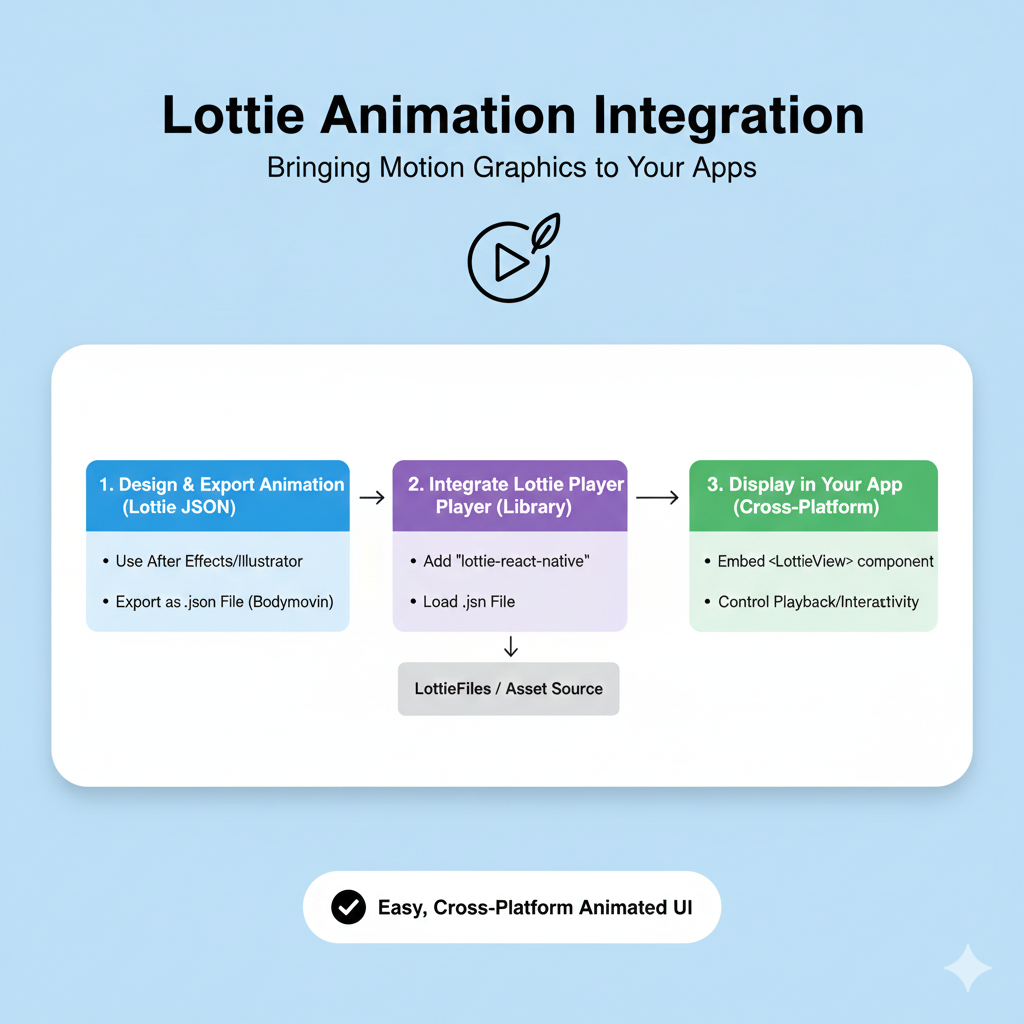
Master Lottie animations with our in-depth guide. Learn to implement lightweight, interactive motion graphics that boost engagement without slowing down your site.
Ever noticed those slick, smooth animations on your favorite apps and websites that just feel right? Not the clunky GIFs that make your page groan under their weight, but those lightweight, buttery-smooth movements that guide your eye, celebrate your interactions, and make an interface come alive? Chances are, you've been admiring the work of Lottie animations. If you're a developer or designer tired of choosing between performance and polish, you're in the right place.
Let's be real: in today's attention economy, static pages just don't cut it. Users expect dynamic, engaging experiences, but we also know that every kilobyte counts. Slow load times are a conversion killer, and Google doesn't hesitate to downgrade sites that offer a poor experience. This is where Lottie swoops in as a game-changer—a JSON-based animation format that gives you Hollywood-quality motion at a file size so small it's almost laughable.
I've wrestled with bloated GIFs and complex JavaScript animation libraries that tanked performance. The frustration is real. That's why getting hands-on with Lottie felt like unlocking a cheat code for modern web development. And at Codercrafter, where we blend cutting-edge theory with practical application, it's exactly the kind of tool we love to master and teach.
So, whether you're looking to spice up a landing page, create intuitive micro-interactions, or just understand what makes apps like Airbnb and Duolingo so visually cohesive, this guide is for you. We're going to break down what Lottie is, why it's awesome, and how you can start using it today—no prior animation expertise needed.
What Exactly is Lottie?
At its core, Lottie is an open-source file format for vector animations. Think of it as a recipe (written in JSON) that tells a player how to draw and move shapes, instead of a pre-baked video of those movements. This recipe-based approach is its superpower.
Here’s the technical breakdown: Designers create animations in tools like Adobe After Effects using a plugin called Bodymovin. This plugin doesn't export a video; it exports a .json file. This file meticulously describes every layer, shape, path, keyframe, and easing curve in the animation. Then, lightweight Lottie player libraries (available for web, iOS, Android, React Native, and more) interpret this JSON file and render the animation in real-time on your device.
The format pays homage to Charlotte "Lotte" Reiniger, a pioneer of silhouette animation, which feels fitting for a technology that simplifies a complex art form.
Why Lottie Beats the Old School
To appreciate Lottie, let's glance at the alternatives we've struggled with:
Format | How It Works | The Catch |
|---|---|---|
GIF | A sequence of compressed image frames. | Huge file sizes, limited colors (256), no transparency control, pixelates when scaled. |
MP4/WEBM Video | Encoded pixel data for each frame. | Good for complex scenes but heavy, scaling causes quality loss, interactive control is clunky. |
CSS/JS Animations | Code instructing the browser to transform elements. | Highly flexible but complex to create from scratch, performance can vary, not designer-friendly. |
SVG Animation | Animating vector graphic (SVG) code directly. | Powerful but browser support can be spotty, files can get large, complex to sync. |
Lottie (JSON) | A set of instructions for drawing and animating vector paths. | Lightweight, scalable, interactive, and multi-platform. |
The difference is stark. A creator on LottieFiles summed it up perfectly: if a PNG is a heavy bison on your homepage, a Lottie is an ant. This efficiency isn't just a nice-to-have; it's critical for user experience (UX) and Search Engine Optimization (SEO), as page speed is a direct ranking factor.
The Irresistible Benefits: Why Everyone's Switching to Lottie
1. Tiny File Size, Huge Impact
This is the headline feature. Lottie animations are, on average, 600% smaller than equivalent GIFs. This means you can have a detailed, seconds-long animation for just a few kilobytes. Faster downloads lead to quicker rendering, happier users, and better SEO performance—a win-win-win.
2. Infinite Scalability with Zero Quality Loss
Because they're based on vector paths (like SVGs) and not pixels, Lottie animations can be scaled to any size—from a smartwatch screen to a 4K monitor—and remain pin-sharp. No more blurry, pixelated mess on retina displays.
3. Play Anywhere
Write once, play everywhere. The same .json file works seamlessly on:
Web (via a JavaScript player)
iOS & Android (native libraries)
React Native, Windows, and more.
This eliminates the need to create and maintain multiple versions of the same animation for different platforms, drastically simplifying the developer handoff.
4. Built for Interaction
Lottie animations aren't just pretty videos you watch. The player exposes controls that let you tie the animation to user behavior. You can:
Play/pause, stop, or loop segments.
Control playback speed.
Trigger animations on scroll, hover, click, or even based on user input.
Dynamically change colors or parts of the animation at runtime.
This opens the door to truly responsive and engaging UI elements, like a "Like" button that fills with color, a progress bar that animates as a form is completed, or a character that reacts to scrolling.
Lottie in the Wild: Real-World Use Cases
Seeing is believing. Here’s how top companies and savvy developers are leveraging Lottie:
Hero Section Animations: Replace static hero images with lightweight, captivating motion graphics that explain your value proposition in seconds without hurting load time.
Micro-interactions & Feedback: Button hovers, success/error states, loading sequences, and toggle switches. These small moments of delight significantly improve perceived usability.
Onboarding & Tutorials: Guide users through a new app or feature with animated illustrations that are more engaging than text or static images.
Animated Icons & Illustrations: Bring your brand's visual assets to life. A subtly pulsing notification icon or a smiling mascot creates a memorable personality.
Data Visualization: Animate charts and graphs to make complex data storytelling more intuitive and engaging, which can increase dwell time on your page—a positive SEO signal.
Pro Tip: For inspiration, check out the work on platforms like LottieFiles, where you can see animations from brands like Google, Airbnb, and TikTok. Notice how they use motion with purpose, not just for decoration.
Your Hands-On Guide to Implementing Lottie
Ready to add Lottie to your project? Here’s a straightforward path.
Step 1: Find or Create Your Animation
You don't need to be an After Effects wizard to get started.
Find Free/Paid Animations: Browse massive libraries like LottieFiles or Creattie. You can search by category ("loading," "success," "finance") and often customize colors directly on the platform before downloading the JSON file.
Create Your Own: If you have design skills, create in Adobe After Effects + Bodymovin plugin, or use beginner-friendly tools like Haiku or the LottieFiles web editor.
Step 2: Integrate on the Web (The Simple Way)
The easiest method is to use the LottieFiles Web Player. Just add a few lines of code to your HTML:
html
<!-- 1. Include the player script -->
<script src="https://unpkg.com/@lottiefiles/lottie-player@latest/dist/lottie-player.js"></script>

<!-- 2. Use the custom element -->
<lottie-player
    src="https://assets.lottiefiles.com/packages/lf20_abc123.json"
    background="transparent"
    speed="1"
    style="width: 300px; height: 300px;"
    hover
    loop
    autoplay>
</lottie-player>
That's it! The hover attribute makes it play on mouseover, a perfect example of easy interactivity.
Step 3: For More Control (Using the Lottie JavaScript Library)
For advanced control, use the official lottie-web library via npm (npm install lottie-web) or a CDN.
javascript
import lottie from 'lottie-web';

// Load the animation
const anim = lottie.loadAnimation({
    container: document.getElementById('lottie-container'), // the DOM element
    renderer: 'svg', // 'canvas', 'html' also available
    loop: true,
    autoplay: true,
    path: 'path/to/your/animation.json' // URL or relative path
});

// Now you can control it with code!
document.getElementById('myButton').addEventListener('click', () => {
    anim.playSegments([0, 30], true); // Play a specific segment
});

// Listen for animation events
anim.addEventListener('complete', () => {
    console.log('Animation finished!');
});
Step 4: Optimize for Performance & SEO
To ensure your animations are a help, not a hindrance, follow these best practices:
Lazy Load Off-Screen Animations: Use the
Intersection Observer APIor a library feature to only load and play animations when they enter the viewport.Optimize the Animation Itself: Work with your designer to simplify complex shapes, reduce the number of layers, and avoid extremely long durations in After Effects before exporting.
Choose the Right Renderer: Use
'svg'for most cases,'canvas'for very complex animations, and'html'for simple ones.Provide a Fallback: Consider a static SVG or CSS placeholder for users with reduced motion preferences (respect
@media (prefers-reduced-motion)).
Mastering these implementation details is key to professional front-end development. To learn professional software development courses such as Python Programming, Full Stack Development, and MERN Stack, visit and enroll today at codercrafter.in, where we dive deep into practical skills like this.
Frequently Asked Questions (FAQs)
Q: Is Lottie free to use?
A: Yes! The Lottie library is open-source and free. Many animations on sites like LottieFiles are also free under various licenses (always check the license). Custom animation design, of course, has a cost.
Q: Can Lottie do 3D animations?
A: Not directly. Lottie is a 2D vector format. However, skilled designers can create isometric (fake 3D) animations that give a convincing 3D feel using 2D layers.
Q: Does Lottie support sound?
A: The JSON format itself does not carry audio. However, you can synchronize an external audio file with the animation playback using JavaScript event listeners.
Q: What are the main drawbacks of Lottie?
A: The primary limitation is that it's not suitable for photorealistic or video-like content (use MP4 for that). Also, extremely complex vector animations with thousands of paths can still become heavy, so simplicity is a virtue.
Q: How do I edit a Lottie file?
A: For simple edits like changing colors or playback speed, you can use the LottieFiles editor online. To change the actual movement or shapes, you must edit the original After Effects project and re-export the JSON.
Conclusion: The Future of UI Animation is Lightweight
Lottie represents a fundamental shift in how we think about motion on the web and in apps. It bridges the gap between designer creativity and developer performance constraints like never before. By delivering small file sizes, flawless scalability, and rich interactivity, it allows us to build interfaces that are not only functional but also joyful and engaging.
The next time you build a project, ask yourself: "Could a thoughtful animation improve understanding or delight here?" If the answer is yes, reach for Lottie. Ditch the bulky GIFs and the over-engineered code. In a digital world where every millisecond and pixel counts, Lottie gives you the power to make your work stand out—for all the right reasons.
Start small. Grab a free animation from LottieFiles, drop it into a side project with a few lines of code, and feel the difference. You might just find it becomes an indispensable part of your development toolkit.
Ready to build the next generation of dynamic, high-performance web applications? The principles behind tools like Lottie are just the beginning. To learn professional software development courses such as Python Programming, Full Stack Development, and MERN Stack, visit and enroll today at codercrafter.in and transform your ideas into reality.









