Geo-Location & Maps Integration: A Complete Developer's Guide 2025
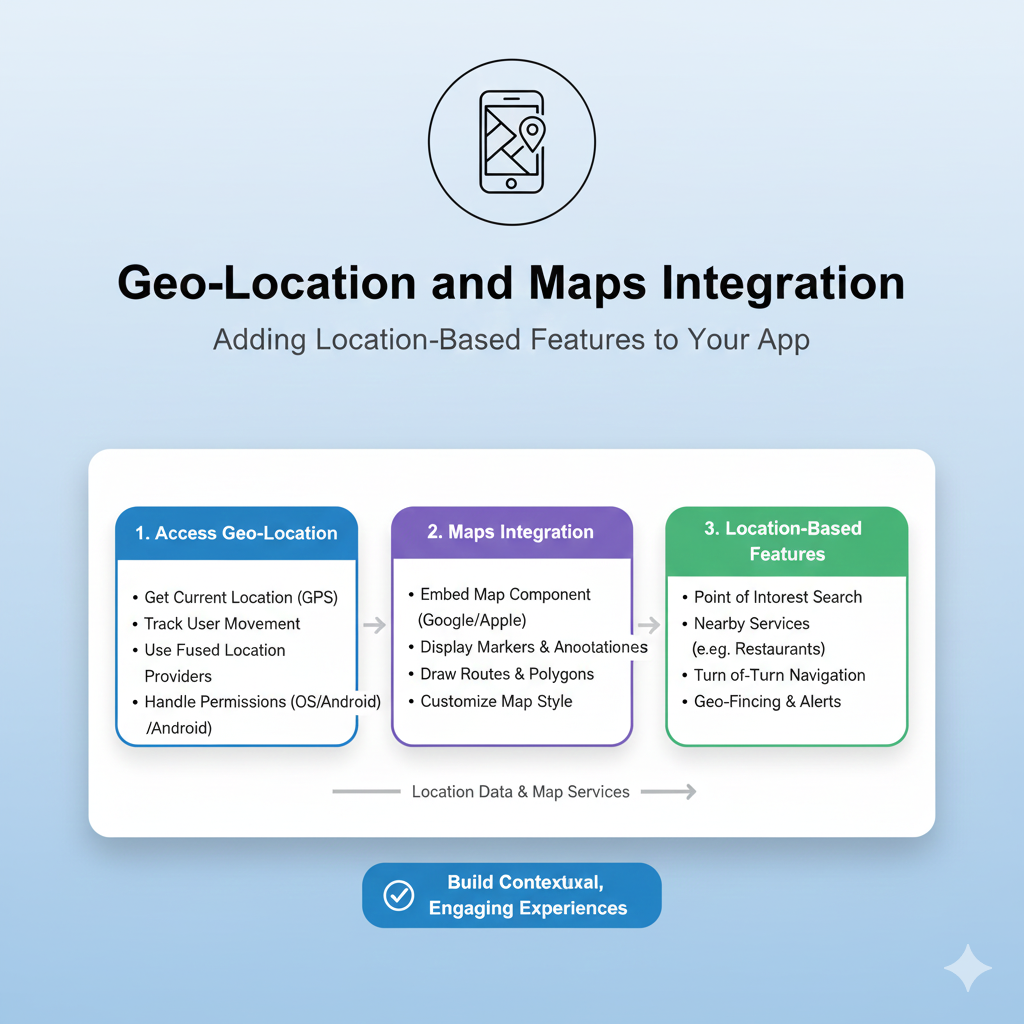
Master geo-location and maps integration with our in-depth guide. Learn real-world implementations, best practices, and tools for adding location intelligence to your apps. Boost your development skills today!
Have you ever wondered how food delivery apps know exactly when your order is arriving, or how ride-sharing services magically connect you with the nearest driver? Spoiler alert: it's not actual magic—it's geo-location and maps integration working behind the scenes. In today's app-driven world, location intelligence has become the secret sauce that transforms ordinary applications into indispensable tools. Whether you're building the next big social platform, a delivery service, or a fitness tracker, understanding how to leverage location data is no longer optional—it's essential.
What Exactly Is Geo-Location Tech?
Let's break it down without the tech jargon overload. Geo-location is simply the process of identifying the real-world geographic location of a device (like your phone or laptop). This isn't just about "you are here" dots on maps—it's about context-aware computing that makes your apps smarter and more helpful.
Think about it: when you open a weather app, it shows your local forecast without asking. When you search for "coffee shops," Google Maps displays the ones nearest to you. That's geo-location in action, using a cocktail of technologies:
GPS: The OG location tech that talks to satellites (super accurate outdoors)
Wi-Fi positioning: Uses nearby Wi-Fi networks to triangulate your position
Cell tower triangulation: Figures out where you are based on which cell towers your phone connects to
IP address geolocation: Makes educated guesses based on your internet connection (less accurate but works anywhere)
Maps integration is what makes this location data visually meaningful. Instead of just giving you coordinates like "37.7749° N, 122.4194° W" (San Francisco, by the way), maps integration translates those numbers into interactive visual interfaces—the familiar maps, markers, routes, and layers we use every day.
Real-World Magic: How Apps Use Your Location
Let's get practical with some examples you've probably used today:
Food Delivery & Ride-Sharing (The Obvious Ones)
Uber, DoorDash, and their cousins live and breathe location tech. They track drivers in real-time, calculate ETAs based on live traffic, optimize delivery routes, and even use geofencing to notify restaurants when a driver is approaching for pickup.
Social & Dating Apps (The Social Connectors)
Ever wondered how Tinder shows you "potential matches nearby" or how Facebook suggests events in your area? That's location intelligence creating serendipity. Instagram uses location tagging to organize content, while Snapchat's famous filters often incorporate location-specific overlays.
Fitness & Health Apps (Your Digital Personal Trainers)
Strava, Nike Run Club, and Fitbit use GPS to track your runs, calculate distance and pace, and map your routes. They're not just recording—they're analyzing elevation, suggesting new routes in your area, and even warning you if you're about to hit a busy intersection.
Retail & E-Commerce (The Shopping Enhancers)
Target's app can show you exactly what aisle an item is in at your local store. IKEA's app uses augmented reality with location data to show how furniture would look in your actual living room. Amazon tracks packages with frightening accuracy, while restaurant apps show you which locations can deliver to your current address.
The Tech Stack: What's Under the Hood?
Building location features isn't as scary as it sounds, thanks to some amazing tools and APIs:
Google Maps Platform - The 800-pound gorilla
Google's suite offers everything from basic maps display to advanced routes, places data, and even indoor maps. Their JavaScript API makes embedding interactive maps surprisingly straightforward. Want to add a custom marker showing your office location? About 10 lines of code.
Mapbox - The designer's favorite
If you want more control over how your maps look and feel, Mapbox is your go-to. Their vector-based tiles let you customize everything—colors, fonts, even 3D terrain. Used by everyone from Facebook to The Weather Channel.
Leaflet - The lightweight open-source option
For simpler implementations or when you're watching your budget, Leaflet is a fantastic open-source library that handles most basic mapping needs beautifully. It's like the reliable compact car of mapping libraries—not fancy, but gets you where you need to go.
Apple MapKit & Core Location - For the iOS ecosystem
If you're building native iOS apps, Apple's frameworks provide seamless integration with the Apple ecosystem, including privacy-focused features and smooth performance on Apple devices.
Building It Right: Best Practices You Can't Ignore
Privacy First, Always
Let's be real—location data is sensitive. Here's how to handle it responsibly:
Always ask for permission (and explain why you need it)
Implement granular permissions (allow while using app vs. always allow)
Let users manually enter location if they prefer
Provide a clear privacy policy explaining how you use location data
Give users an easy way to revoke location access
Performance Matters
Nobody likes a laggy map that drains battery. Optimize by:
Loading map tiles efficiently (consider lazy loading)
Throttling location updates when high precision isn't needed
Using appropriate zoom levels—don't load the entire world if you're showing a city block
Implementing caching for frequently accessed locations
Design for Real Users
Your map interface should be intuitive, not overwhelming:
Use clear, recognizable markers (everyone knows what a red pin means)
Provide multiple ways to interact (tap, drag, search)
Consider accessibility—colorblind-friendly palettes, proper contrast
Test on actual devices, not just simulators (GPS behavior can vary)
Cost Consciousness
Mapping services can get expensive at scale. Control costs by:
Monitoring your API usage (set up alerts for unexpected spikes)
Implementing caching to reduce redundant API calls
Using static maps for simple displays instead of interactive ones
Considering open-source alternatives for less critical features
Common Pitfalls (And How to Dodge Them)
The Battery Drain Monster
Continuously polling GPS can murder battery life. Solution: Use the appropriate accuracy level ("kilometer" is fine for finding nearby cities, save "best" for navigation) and consider using significant location change APIs that wake your app only when the user has moved substantially.
The "Why Do You Need My Location?" Rejection
If users don't understand why you're asking, they'll say no. Always provide context—"We need your location to show restaurants near you" converts much better than a generic permission request.
The Offline Nightmare
What happens when your user goes underground or into a rural area with spotty service? Implement graceful degradation—cache recent locations, allow manual input, or use last-known position with appropriate disclaimers.
The Cross-Platform Headache
Location services behave differently on iOS vs. Android vs. web. Test thoroughly on all platforms, and consider using cross-platform frameworks like React Native or Flutter that abstract some of these differences.
Your Location Learning Journey
Feeling inspired to add location superpowers to your apps? Whether you're a beginner looking to add a simple "find nearest store" feature or an experienced developer building complex geospatial analytics, the journey starts with solid fundamentals.
If you're serious about leveling up your development skills—including mastering practical implementations of geo-location and maps integration—consider structured learning paths. To learn professional software development courses such as Python Programming, Full Stack Development, and MERN Stack, visit and enroll today at codercrafter.in. Their hands-on approach to teaching in-demand tech skills can accelerate your journey from location-tech curious to location-powered developer.
FAQs: Your Burning Questions Answered
Is collecting location data a privacy risk?
It can be, which is why transparency and user control are non-negotiable. Modern platforms require explicit user consent, and best practice is to collect only what you need and anonymize where possible.
How accurate is GPS really?
Under ideal conditions (clear sky view), GPS can be accurate within 4.9 meters (16 feet). Urban environments with tall buildings can reduce accuracy to 10-20 meters, and indoor locations often require supplemental technologies like Wi-Fi positioning.
What's the difference between geolocation and GPS?
GPS is one technology that enables geolocation. Geolocation is the broader concept of determining location, which can use GPS, Wi-Fi, cell towers, IP addresses, or a combination of these.
How much does it cost to integrate maps?
Many services offer free tiers (Google Maps: $200 free monthly credit, Mapbox: 50,000 free monthly active users). Costs scale with usage, so monitor your implementation as your user base grows.
Can I use maps offline?
Yes, with planning. Both Google Maps and Mapbox offer offline capabilities, but you need to download map tiles for the relevant areas in advance while online.
The Road Ahead: Where Location Tech Is Going
The future of geo-location is looking increasingly sophisticated. Augmented reality navigation (think arrows superimposed on the real world through your phone camera) is becoming mainstream. Indoor positioning systems are helping people navigate airports, malls, and museums. Predictive location (where your app anticipates where you're going based on patterns) is creating more proactive experiences.
The integration of AI with location data is opening up fascinating possibilities—imagine traffic systems that predict and prevent congestion before it forms, or delivery networks that dynamically reroute based on real-time conditions.
Wrapping Up: Your Location-Powered Future
Geo-location and maps integration have evolved from "nice-to-have" features to fundamental components of modern applications. The magic of knowing "where" transforms generic tools into personalized experiences that understand context and anticipate needs.
Whether you're just starting your development journey or looking to add another skill to your toolkit, location intelligence offers tangible ways to create value for users. Start small—add a store locator to your website, implement a "share your location" feature in your app, or visualize data on an interactive map.
The tools are more accessible than ever, the use cases continue to expand, and the opportunity to build something that literally helps people navigate their world is waiting. Your next project could be the one that helps someone find their way home, discover a new favorite spot, or connect with people nearby.









