Style React Native Apps with Tailwind: The NativeWind Guide
Learn how to use Tailwind CSS in React Native with NativeWind. This guide covers setup, real-world components, best practices, and FAQs for mobile developers.
Style React Native Apps with Tailwind: The NativeWind Guide
Mastering Tailwind CSS in React Native: The Ultimate NativeWind Guide
Ever found yourself drowning in React Native’s StyleSheet.create({...}) and wishing you could just write className="bg-blue-500" like in your web projects? You're not alone. This guide is your ticket to bringing the speed and utility-first magic of Tailwind CSS into your React Native apps. Let’s cut the boilerplate and start styling with purpose.
Why Even Bother? The NativeWind Pitch
First, let’s be real. Styling in React Native can be a chore. You jump between files, create verbose style objects, and often end up with inconsistent designs. Tailwind CSS revolutionized web development by letting you style directly in your markup with a design system. NativeWind does the exact same thing for React Native.
It’s more than a convenience—it’s a paradigm shift. NativeWind transforms Tailwind's utility classes into optimized React Native style objects under the hood, giving you a unified styling language across platforms. The result? You build UIs faster, ensure design consistency, and make your code infinitely more readable.
Companies from Shopify to OpenAI use Tailwind to build their web presence. Now, you can bring that same efficiency and scalability to your mobile projects.
Getting Started: The Zero-to-Hero Setup Guide
Let's roll up our sleeves and get NativeWind running in your project. We’ll use Expo for its simplicity, but the principles apply to React Native CLI projects too.
1. Create Your Expo Project
Kick things off with a clean slate. Open your terminal and run:
bash
npx create-expo-app@latest YourAppName
cd YourAppName
npx expo start
This gives you a fresh project. Optionally, run npm run reset-project to clear the default example for a cleaner start.
2. Install NativeWind & Dependencies
This is the crucial step. You’ll install NativeWind and its core dependencies:
bash
npm install nativewind tailwindcss react-native-reanimated@3.16.2 react-native-safe-area-contextnativewind: The bridge that makes Tailwind work in React Native.tailwindcss: The core Tailwind engine.react-native-reanimated&react-native-safe-area-context: Peer dependencies for handling animations and safe screen areas.
3. Configure Tailwind
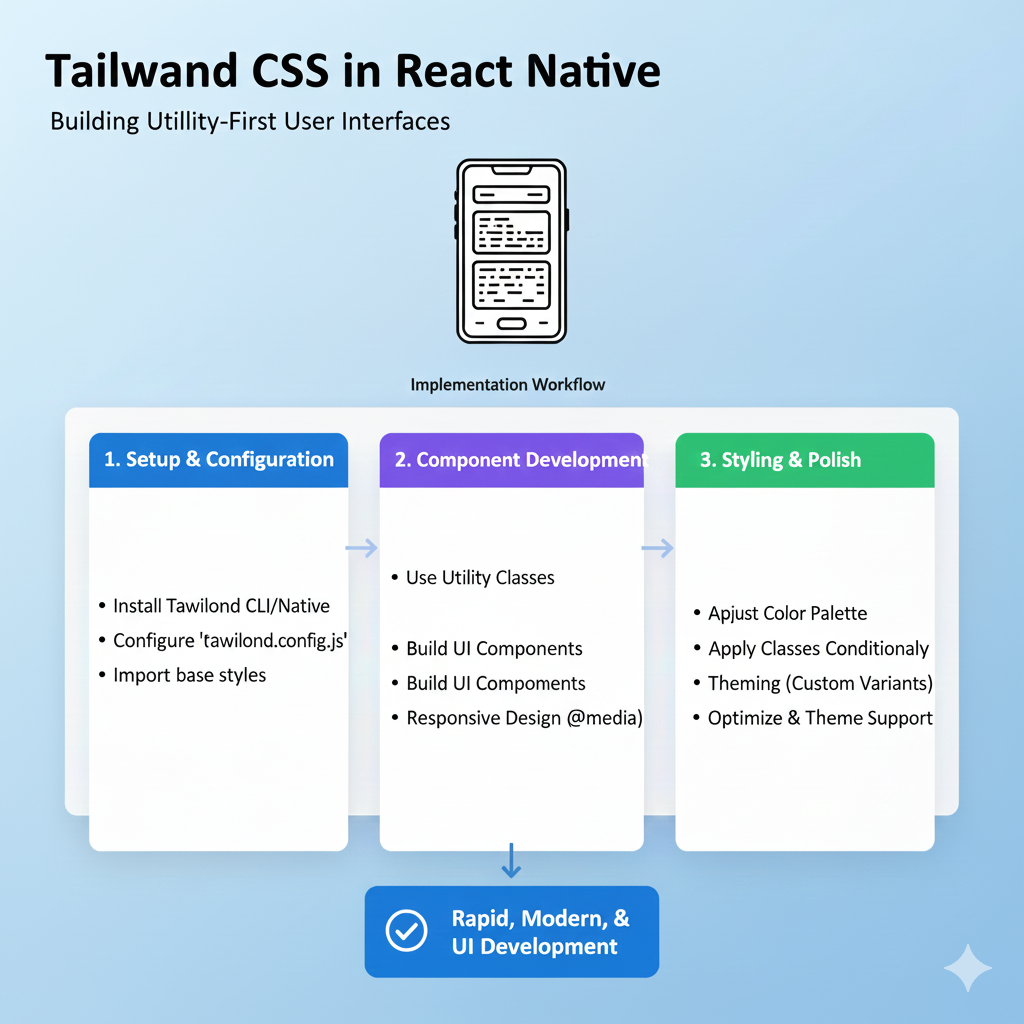
Now, let’s wire everything up. Generate your Tailwind config file:
bash
npx tailwindcss initThen, update the generated tailwind.config.js file. The presets: [require("nativewind/preset")] line is key—it tells Tailwind to use NativeWind’s mobile-optimized defaults.
javascript
// tailwind.config.js
module.exports = {
  content: ["./app/**/*.{js,jsx,ts,tsx}"],
  presets: [require("nativewind/preset")],
  theme: {
    extend: {},
  },
  plugins: [],
}
4. The Final Configuration Touches
A few more files to set up, and you’re golden:
Create
global.css: Add this file at your project root with the standard Tailwind directives:css
@tailwind base;
@tailwind components;
@tailwind utilities;
Update
babel.config.js: This allows your JSX to understand theclassNameprop.javascript
module.exports = function (api) {
  api.cache(true);
  return {
    presets: [
      ['babel-preset-expo', { jsxImportSource: 'nativewind' }],
      'nativewind/babel',
    ],
  };
};
Configure Metro (Expo's bundler): Create or update
metro.config.js:javascript
const { getDefaultConfig } = require('expo/metro-config');
const { withNativeWind } = require('nativewind/metro');
const config = getDefaultConfig(__dirname);
module.exports = withNativeWind(config, { input: './global.css' });
Import the CSS: Finally, import your
global.cssin your app’s entry point (likeapp/_layout.tsxorApp.js).
Pro Tip: Clear your development cache with npx expo start --clear if the styles aren’t showing up immediately.
From Theory to Practice: Building a Real Component
Enough configuration—let's build something you'd actually use. We’ll create a versatile, stateful Button component, the kind that appears in almost every app.
Step 1: The Foundation with styled()
NativeWind provides a styled() function—similar to styled-components—to create reusable styled primitives.
javascript
import { styled } from 'nativewind';
import { Pressable, Text } from 'react-native';

const StyledPressable = styled(Pressable);
const StyledText = styled(Text);
Step 2: Building the Button Logic
Here’s a robust Button component with primary and default variants and interactive states:
javascript
// Button.jsx
import React from 'react';
import { StyledPressable, StyledText } from './your-styled-file';

const variantStyles = {
  default: { bg: 'bg-white', text: 'text-black' },
  primary: { bg: 'bg-blue-500', text: 'text-white' },
};

function Button({ title, onPress, disabled, variant = 'default' }) {
  return (
    <StyledPressable
      onPress={onPress}
      disabled={disabled}
      className={`
        rounded-lg p-3 my-1
        ${disabled ? 'bg-gray-300 opacity-50' : variantStyles[variant].bg}
        ${!disabled && 'active:opacity-80'} // Adds a press effect
      `}
    >
      <StyledText className={`text-center font-bold ${variantStyles[variant].text}`}>
        {title}
      </StyledText>
    </StyledPressable>
  );
}

export default Button;
What’s happening here?
Dynamic Classes: We use template literals to conditionally apply classes for
disabledstate andvariant.Interactive States: NativeWind supports pseudo-classes like
active:for press feedback, which is a game-changer for mobile UX.Consistency: The design tokens (colors, padding, rounding) are enforced by Tailwind, ensuring every button looks exactly as intended.
Leveling Up: Best Practices for Scalable Apps
As your project grows, a "class soup" of inline utilities can become a maintenance nightmare. Here’s how to keep your codebase clean and professional.
Extract Reusable Components: This is the single most important practice. Don't repeat long class strings. Componentize common UI patterns like Cards, Badges, or Input fields.
Use
@applyfor Repeated Patterns: In yourglobal.css, use@applyto create custom utility classes for combinations you use often.css
/* global.css */
.btn-primary {
  @apply bg-blue-600 text-white px-4 py-2 rounded-lg hover:bg-blue-700;
}
Extend Your Theme: Define your brand colors, fonts, and spacing in
tailwind.config.js. This creates a single source of truth for your design system.javascript
// tailwind.config.js
theme: {
  extend: {
    colors: {
      brand: '#1DA1F2', // Now use 'bg-brand' or 'text-brand'
    },
  },
}
Use Prettier with the Tailwind Plugin: Automatically sort your class names in a consistent, readable order. It’s a small thing that makes a huge difference for team collaboration.
Want to dive deeper into these advanced patterns and architect large-scale applications the right way? To learn professional software development courses such as Python Programming, Full Stack Development, and MERN Stack, visit and enroll today at codercrafter.in. Our curriculum is designed to take you from foundational concepts to industry-ready best practices.
Your NativeWind Questions, Answered (FAQs)
Let’s tackle some common hurdles.
Q1: Can I use NativeWind with React Native CLI (non-Expo) projects?
A: Absolutely. The installation steps are very similar. You’ll create a project with npx react-native init, then follow the same NativeWind installation and configuration steps. The key difference is in the Babel and Metro config, which you'll adapt for your CLI project structure.
Q2: Is there a performance hit compared to regular StyleSheet?
A: Negligible for most apps. NativeWind processes most styles at build time, generating optimized style objects. The runtime overhead is minimal and focused on dynamic styling. The developer experience and consistency gains far outweigh any micro-performance cost.
Q3: How do I handle dark mode?
A: NativeWind has excellent dark mode support. Use the dark: prefix (e.g., dark:bg-gray-900) directly in your classes. You can control the mode using React Native's Appearance API or a state management library.
Q4: My styles aren't updating! What do I do?
A: This is the most common issue. Follow this checklist:
Restart your Metro bundler: Always run
npx expo start --clearafter configuration changes.Check file paths: Ensure the
contentarray intailwind.config.jscorrectly points to all your component files.Verify imports: Confirm
global.cssis imported in your root layout/App file.
Wrapping Up: Why This Combo is a Game-Changer
Bringing Tailwind CSS to React Native via NativeWind isn't just about writing fewer lines of code. It's about adopting a systematic, scalable, and highly productive approach to mobile UI development. You move from writing individual styles to applying a coherent design language, which speeds up prototyping, ensures visual consistency, and makes your codebase dramatically easier to read and maintain.
The setup might seem like a few extra steps initially, but the long-term payoff is immense. You're not just styling an app; you're building a maintainable design system for it.
Ready to build? Start by adding a single styled component to your existing project. Then, gradually refactor your styles. You'll quickly wonder how you ever built React Native apps without it.
And if you're looking to master not just styling, but the full spectrum of modern web and mobile development, explore our structured courses. To learn professional software development courses such as Python Programming, Full Stack Development, and MERN Stack, visit and enroll today at codercrafter.in. From utility-first CSS to full-stack architecture, we’ll help you craft your developer journey.