REST API Security Best Practices: The 2025 Developer's Guide
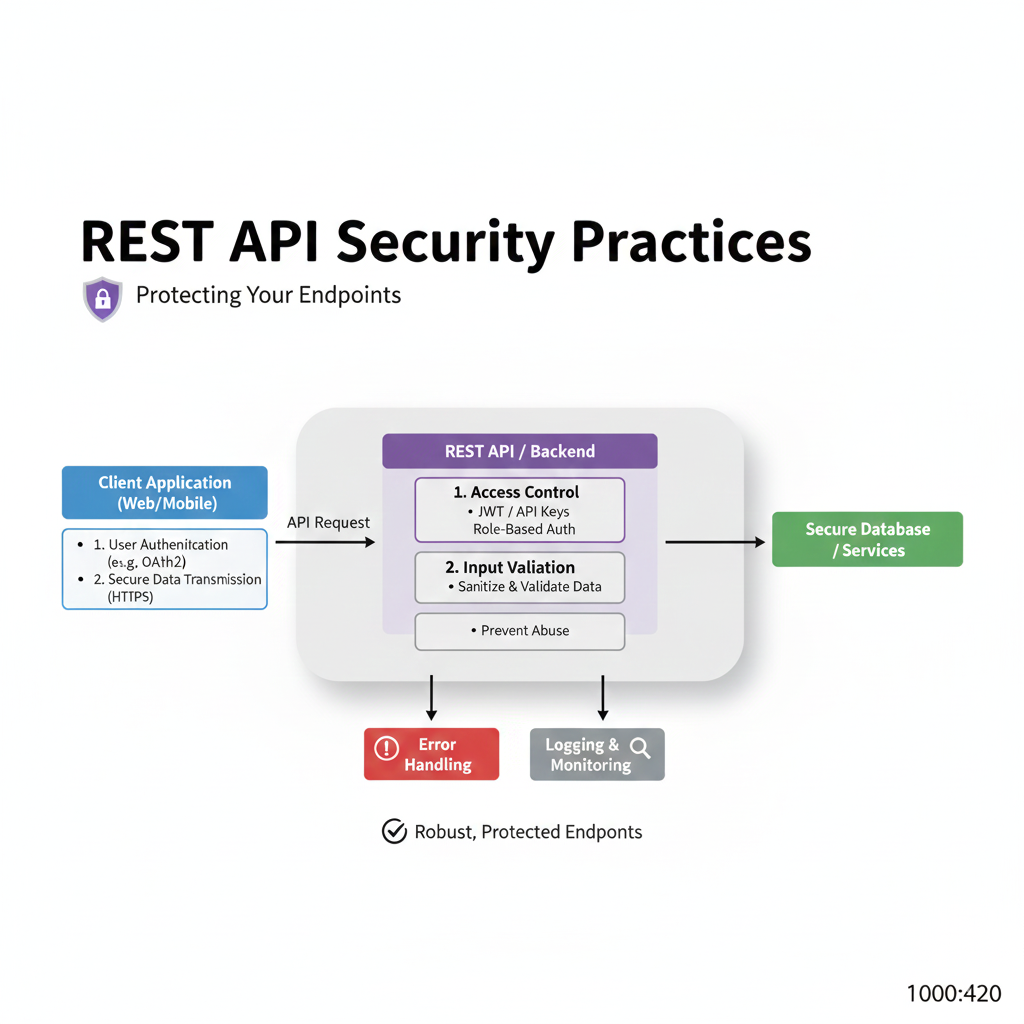
Don't get hacked. Our in-depth 2025 guide covers essential REST API security practices, from authentication to rate limiting, with real code examples. Learn to build secure apps.
Let's be real: in a world where we’re practically living our lives through apps, APIs are the silent workhorses making everything happen. That Uber you booked? The Instagram story you posted? The weather app you checked? All powered by APIs. But here’s the scary part: a poorly secured API is like leaving your house keys under the doormat with a neon sign pointing to it.
If you're building anything on the web today, understanding REST API security isn't just a "nice-to-have"—it's survival. This isn't about boring protocols; it's about protecting user data, your company’s reputation, and yes, your job. So, grab your coffee, and let's break down exactly how to fortify your digital doors.
What Even is a REST API? (And Why Should You Care?)
In simple terms, a REST API (Representational State Transfer Application Programming Interface) is a set of rules that lets different software talk to each other over the internet. Think of it as a waiter in a restaurant: you (the client) give your order (the request) to the waiter, who takes it to the kitchen (the server), and then brings your food (the response) back to you.
The "REST" part just means it follows certain architectural principles—it’s stateless, uses standard HTTP methods (GET, POST, PUT, DELETE), and communicates often in JSON. It's the go-to choice because it's simple, scalable, and flexible.
Why the security panic? Because APIs expose your application's internal logic and data. A breach here doesn't just mean a hacked website; it can mean millions of user records, financial data, or even control over smart devices leaking out. Remember the Facebook API leak that exposed 530 million users? Yeah, that.
The Hacker's Playbook: Common API Attack Vectors (Real-World Nightmares)
Before we build defenses, let's understand the attacks. These aren't theoretical; they happen daily.
Broken Object Level Authorization (BOLA): The #1 API security risk according to OWASP. Imagine you can view your own user profile by visiting
/api/users/123. What happens if you change the ID to124? If you see someone else’s data, that's BOLA. A single missing check can spill the entire user database.Injection Attacks: Old but gold for hackers. Sending malicious data (SQL, NoSQL, commands) in an API request to trick the server into executing it. It's like handing the waiter a note that says, "Ignore my order, just give me the keys to the pantry."
Mass Assignment: An API endpoint that blindly accepts all properties sent in a request. For example, a
POST /api/usersmeant to create a user might accept{ "name": "John", "email": "john@mail.com", "isAdmin": true }. A sneaky attacker adds"isAdmin": trueand suddenly has admin privileges.DDoS & Rate Limiting Bypass: APIs without rate limits are asking to be hammered into oblivion by bots, making them unavailable for real users.
Sensitive Data Exposure: APIs that return too much info. An endpoint for a user's profile might accidentally send back their password hash, billing address, and security questions in the response.
Your API Security Toolkit: Best Practices You Can't Ignore
Alright, enough doom-scrolling. Let's talk about building that unbreakable vault. Here’s your actionable checklist.
1. Authentication & Authorization: The Bouncer and the Manager
Authentication (The Bouncer): Who are you? Always use robust standards.
OAuth 2.0 & OpenID Connect: The industry standard. Don't roll your own. Use proven libraries. It handles tokens, scopes, and flows so you don't have to.
API Keys: Good for server-to-server communication, but never in frontend code (they'll get stolen). Rotate them regularly.
Authorization (The Manager): What are you allowed to do?
Implement fine-grained access control on every single endpoint. Validate if the authenticated user has the right to access the specific resource they're requesting. Every. Single. Time.
2. The Magic of HTTPS & TLS
This is non-negotiable. Always use HTTPS. It encrypts data in transit, preventing "man-in-the-middle" attacks where someone snoops on the connection. Get a TLS certificate (they're free from Let's Encrypt) and enforce it. Redirect all HTTP traffic to HTTPS.
3. Validation is Your Best Friend
Never, ever trust client input. Assume every request is malicious until proven otherwise.
Input Validation: Validate data type, length, format, and range. Use whitelists (allow only known good values) over blacklists.
Output Encoding: Encode data before sending it in responses to prevent Cross-Site Scripting (XSS) if the API feeds a web frontend.
4. Rate Limiting & Throttling
Protect your API from abuse and traffic spikes. Define how many requests a user/IP/API key can make in a minute/hour/day. Return clear HTTP 429 Too Many Requests responses. This also prevents credential stuffing and brute-force attacks.
5. The Principle of Least Privilege
Give an identity (user, service, endpoint) only the permissions it needs to perform its function—and nothing more. If an internal microservice only needs to read data, don't give it delete permissions.
6. Security Headers are Your Silent Guardians
Add these HTTP headers to your responses:
Content-Security-Policy: Mitigates XSS attacks.Strict-Transport-Security (HSTS): Forces browsers to use HTTPS.X-Content-Type-Options: nosniff: Prevents MIME-type sniffing.
7. Logging & Monitoring (The CCTV)
Log all authentication attempts (success and failure), access to sensitive data, and server errors. But be careful: Never log passwords, API keys, or tokens. Use tools like the ELK Stack or cloud monitoring (AWS CloudWatch, Google Cloud Monitoring) to set up alerts for suspicious activity.
8. Regular Security Audits & Penetration Testing
Schedule regular scans. Use static (SAST) and dynamic (DAST) application security testing tools. Better yet, hire ethical hackers to try and break your API. You can't fix what you don't know is broken.
Putting It All Together: A Secure Endpoint Example
Let's say we're building a GET /api/orders/{orderId} endpoint.
The Naive (Dangerous) Way:
javascript
app.get('/api/orders/:id', (req, res) => {
  Order.findById(req.params.id, (err, order) => {
    res.json(order); // Sends the order to whoever asks!
  });
});
The Secure Way:
javascript
app.get('/api/orders/:id',
  authenticateToken, // Middleware: Validates JWT
  async (req, res) => {
    // 1. Input Validation
    const orderId = req.params.id;
    if (!isValidObjectId(orderId)) {
      return res.status(400).json({ error: 'Invalid order ID format' });
    }

    // 2. Fetch Resource
    const order = await Order.findById(orderId);
    if (!order) {
      return res.status(404).json({ error: 'Order not found' });
    }

    // 3. AUTHORIZATION CHECK (CRITICAL!)
    if (order.userId.toString() !== req.user.id && !req.user.isAdmin) {
      // Log this unauthorized attempt
      logger.warn(`Unauthorized access attempt to order ${orderId} by user ${req.user.id}`);
      return res.status(403).json({ error: 'Forbidden' });
    }

    // 4. Sensitive Data Filtering
    const sanitizedOrder = {
      id: order._id,
      items: order.items,
      total: order.total
      // Deliberately NOT sending internal cost, profit margins, etc.
    };

    // 5. Send Secure Response
    res.setHeader('X-Content-Type-Options', 'nosniff');
    res.json(sanitizedOrder);
});
(Rate limiting would be applied at a global/route level)
FAQ: Quick-Fire Answers
Q: Is HTTPS enough for security?
A: Absolutely not. HTTPS is just the first layer—it encrypts traffic. You still need authentication, authorization, validation, and all the other practices.
Q: Should I use JWT or sessions for API auth?
A: JWTs are stateless and great for scalability in distributed systems (microservices). Sessions are simpler and easier to invalidate. The choice depends on your architecture. For most REST APIs, JWTs are standard.
Q: How often should I rotate API keys?
A: For high-privilege keys, every 90 days is a good rule. Have a system in place to seamlessly issue new keys before old ones expire.
Q: My API is internal. Do I still need to secure it?
A: YES! The "internal only" mindset causes major breaches. Adopt a Zero Trust model: never trust, always verify, even inside your network.
Conclusion: Security is a Journey, Not a Checkbox
API security isn't about adding one magic plugin and calling it a day. It's a mindset that needs to be woven into your development lifecycle—from design and coding to testing and deployment.
Start with the basics: HTTPS everywhere, validate everything, implement rock-solid auth, and apply the principle of least privilege. Use tools like API gateways (Kong, AWS API Gateway) that can help enforce policies like rate limiting and validation.
Building secure systems is what separates hobbyist code from professional, production-ready software. It's a complex but essential skill.
Want to build these skills hands-on? To learn professional software development courses such as Python Programming, Full Stack Development, and MERN Stack—where we dive deep into building secure, scalable applications with industry best practices—visit and enroll today at codercrafter.in. Check out our free resources, like our developer tools (including a handy CMYK to RGB converter) to get started.









